
ImportParameters
Hiermee worden uitvoeringsparameters uit het parameterbestand geladen en toegewezen aan de uitvoeringsrecord (koppeling tussen de audittest en de IDEA-tabel).
Compatibiliteit
Beschikbaar vanaf IDEA-versie 12.0
Syntaxis
ImportParameters(filePath As String)
Parameters
filePath
Het pad naar het parameterbestand
Opmerkingen
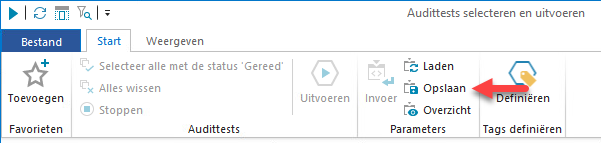
Het parameterbestand moet worden aangemaakt met de functie Opslaan in SmartAnalyzer (tabblad Start, de groep Parameters):
Voorbeeld
Sub Main()
	Dim SA
	Dim atExecutor
	Dim Tagging
	Dim parameters
	Dim paramCheckBox1
	Dim paramSingleList1
	Set SA = CreateObject("SmartAnalyzer.AutomationClient")
	atId = "f4d65220-77f1-5969-8943-59c7bd448460"
	tblName = "Sample-Weblog"
	' ----------------- Create exec record ---------------------
	Set Tagging = SA.GetTagging(tblName)
	Tagging.SetTag "Comment", "SITE"
	Tagging.Save True
	' ----------------- Import parameters ---------------------
	Set atExecutor = SA.GetAtExecutor(atId, tblName)
	atExecutor.ImportParameters "C:\Data\MyParams.params"
	' ----------------- Get and display new parameters' values ---------------------
	Set parameters = atExecutor.Parameters
	Set paramCheckBox1 = parameters.Get("smartCheckBox1")
	Set paramSingleList1 = parameters.Get("smartSingleList1")
	MsgBox"New value of chexbox1: " & paramCheckBox1.Value
	FOR EACH v IN paramSingleList1.Value
		MsgBox"Next new value of singleList1: '" + v + "'"
	NEXT
End Sub