
Working Paper Highlights
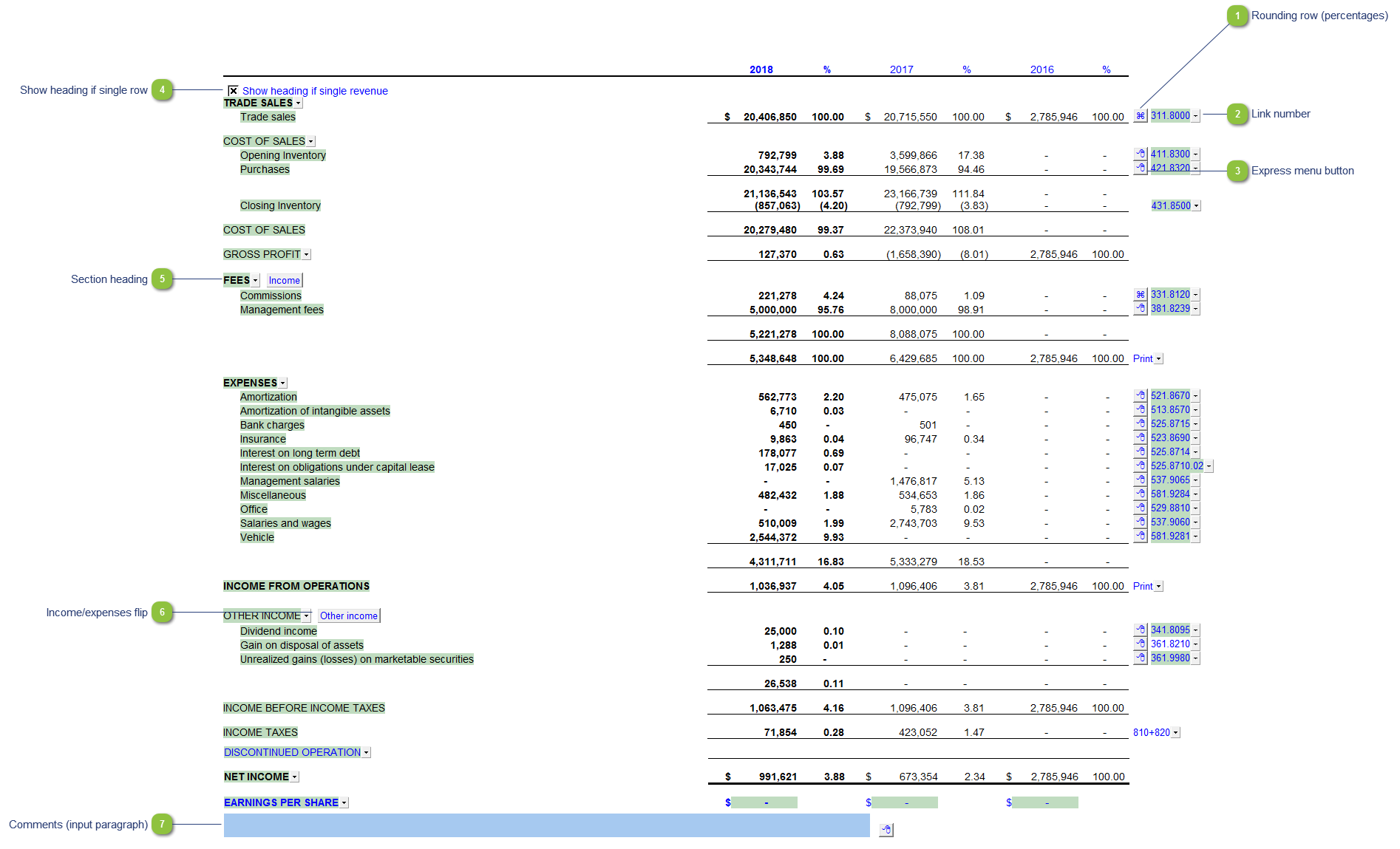
| Number | Name | Description |
|---|---|---|

|
Rounding row (percentages) |
To apply the % rounding difference to a row, right-click on the express menu and select Adjust this row for % rounding. Note: This is separate from the normal rounding in this WP see the Working paper Options for information on that rounding function. |

|
Link number |
The link number indicates which linked number (i.e. map number) the row is linked to. Use the popup menu to select a link number. This can be a map, account or group number depending on the link type selected. Refer to Balance Origins for more information. |

|
Express menu button |
Right-click on the express menu to insert more linked or manual lines, insert subtotals, sort and delete current lines where the options are available. |

|
Show heading if single row |
Select if the section only has a single numeric row and you would like the section heading to print. |

|
Section heading |
Select the wording to display on the section heading or enter your own. |

|
Income/expenses flip |
Set the section as either an income or expense section. |

|
Comments (input paragraph) |
You can edit existing input paragraphs or insert more paragraphs using the express menu. Refer to Input Paragraphs for more information on inserting paragraphs. |