View queries (the Query dashboard)
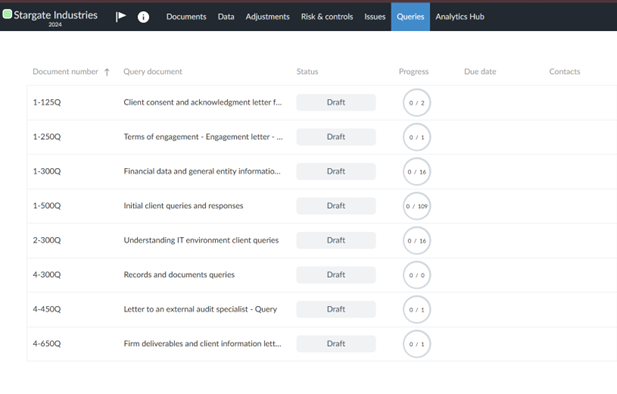
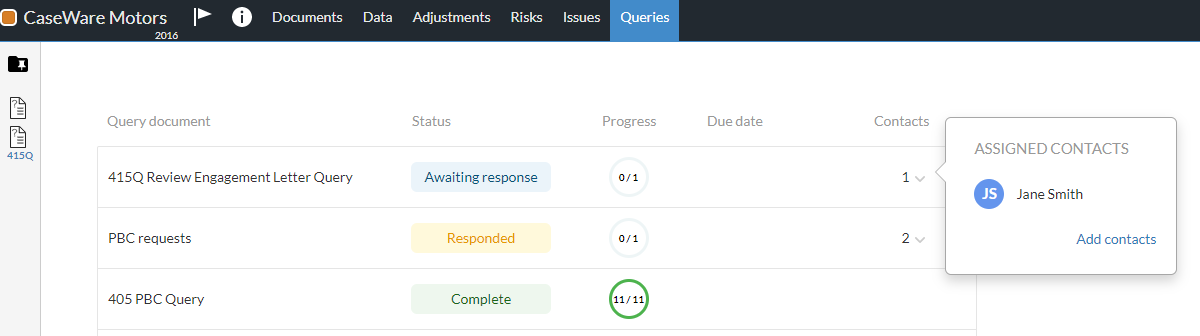
To keep track of your progress and contacts' progress on queries, you can go to the Query Dashboard page. The dashboard features a list of the visible queries in the engagement file. It consists of the following columns:
-
Document Number - Document number of the query document. If a query has no document number, this column is blank.
-
Query document - title of the query.
-
Status - status of the query. Available options are:
Option Description 
You haven't sent the query to the contacts yet. 
You reopened the query to make modifications or request further information or clarifications. 
Contacts responded to all questions in the query. 
You have sent the query to contacts and they haven't responded yet. 
You've marked the query as completed. 
You canceled the query. -
Progress - tracker of the contacts progress. It shows the number of answered questions out of the total questions in the request.
-
Due date - shows the query due date.
-
Contacts - displays the number of assigned contacts to each query document in the dashboard. You can also select a number to display a popup showing contact details. The popup also includes the Add contacts button which allows you to create a contact, if needed.
To access the Query Dashboard in your engagement file:
-
Open the engagement file.
-
Go to the Queries page. A list of the available queries in the engagement file displays on the page.
The Query Dashboard includes separate columns for document numbers and document names, which makes the query list easier to scan. Previously, the document number appeared as a prefix in the Query document column. The document number now displays in its own column.
To sort the query list, click a column heading.
-
If you sort by Document Number, queries are sorted alphanumerically. Queries without document numbers appear at the bottom of the list.
-
If you sort by Query document, queries are sorted by document name only.
-
If a document number exceeds the column width, an ellipsis (...) appears. Hover over the value to view the full document number.