
Journal Entry Relevance Ranking
The Journal Entry Relevance Ranking (JERR) analytic package provides a relevance-based sort order for testing recommendations that map to worldwide audit standards. It is designed to support journal entry (JE CAAT/JET) testing more efficiently.
Unlike rule lists or anomaly detection approaches that can increase noise, JERR ranks entries based on their relevance for journal entry testing.
Use JERR only for JE CAAT/JET testing related to public accounting and auditing. It is likely unsuitable for other purposes. Link JERR to your engagement procedures.
JERR can be enabled by firm or enterprise authors, or by Caseware. See Enable JERR.
Statistical approach to relevance ranking
The ranking methodology used in this analytic package addresses the need for relevance, rather than relying on generic anomaly detection that ranks the differences between similar transactions, even though this is a common practice. It aligns directly with auditing regulations, ensuring that flagged entries are meaningful for journal entry testing while optimizing processing efficiency.
Process steps:
-
Narrow the scope:
Data is filtered to include only journal entries (e.g. general journals) and exclude sources like AR and AP modules, which are outside the regulatory focus. This step reduces processing overhead and focuses analysis on regulatory requirements, as the procedure is typically related to fraud risk (i.e. the highest risk in a general ledger within general journals).
Data may include manual and system, or only manual general journals, depending on the general journal mapping in the general ledger (GL). If your GL allows you to separately identify manual and system-created general journals, map to the manually created general journals as these would be the highest fraud risk aligned with the various global audit standards.
-
Rule-based testing:
A set of rule-based tests is applied to the filtered dataset, based on examples identified (as of August 30, 2024) in the following relevant auditing standards:
-
International Public and Private Company Audit (IAASB): ISA 240 par. 31-32, A41-44
-
US Private Company Audit (ASB): AU-C 240 par. 31-32, A47-50
-
US Public Company Audit (PCAOB); AS 2401 par. 57-62
These 12 tests include:
-
JE-Transactions with a date range
-
JE-Keyword search
-
JE-Key Users
-
JE-Percentage high value amount
-
JE-Out of balance entries
-
JE-Amounts with recurring numeric pattern
-
JE-Complex account combinations
-
JE-Missing descriptions
-
JE-Missing ID
-
JE-Missing codes
-
JE-Missing dates
-
JE-Unusual account combinations
The input data for the relevance ranking step contains transactions that have already been flagged or not flagged for each of these 12 predefined tests. Positive results are represented as "1", while negative results are represented as "0".
-
-
Calculating ratios:
For each test, the following values are calculated:
-
The number of positive occurrences (flagged rows).
-
The total number of rows in the dataset.
These are used to compute a ratio for each test:
Ratio = (Number of Positive Occurrences) / (Total Rows in Dataset)
A ratio closer to 1 indicates more flagged transactions, while a ratio closer to 0 indicates fewer flagged transactions.
-
-
Weighting individual rules:
The JERR’s foundation is based on a concept that dynamically weights each test result based on its prevalence in the general ledger. For each positive result, an adjusted score is calculated using the formula:
Adjusted Score = Positive Result × (1 − Ratio)
This weighting ensures that rarer occurrences have a stronger influence on the final relevance rank.
-
Aggregating results for relevance:
For each journal entry, the adjusted scores from all tests are combined using the formula:
Final Score = [Σ Adjusted Score] / Number of tests with positive results
The final aggregated value indicates the relevance rank of each journal entry for testing, with values closer to 1.0 suggesting higher relevance. By emphasizing relevance rather than rarity alone, JERR ensures that flagged entries are meaningful and actionable for journal entry testing.
-
Output:
The final score for each transaction is stored in a field named score and organized in descending order, with the most relevant transactions appearing first and the least relevant last.
-
Selection criteria:
We recommend that each firm or organization adds final selection criteria to the relevance ranking for their methodologies. Selection criteria could align with historical sample sizes deemed appropriate for JE CAAT/JET testing, for example, ‘select the top 25 rankings’.
This approach leverages historically appropriate methodologies related to sampling, while providing a sort order for recommendations to sample based on direct linkage to standards. It also ensures higher quality over historic sampling methods, due to the extensive interrogation of the data set and the relevance score derived from the prevalence of the attribute.
Other approaches could be based on anything over a set relevance threshold or percentage of non-zero scores. However, due to the variable nature of dynamic weighting and the variety of ledgers across industries and clients, this may lead to extreme diversity in outcomes with little linkage to a rationale for selection.
Attach JERR and other analytics to a procedure
As an author, you can attach JERR and other analytics, including additional journal entry tests, subledger analytics and standalone sampling to procedures within a checklist.
This feature lets you:
-
Show only analytics that are valid for the selected procedure.
-
Remove outdated analytics when you switch analytic types.
-
Prevent invalid analytic combinations.
To attach analytics to a procedure:
-
Ensure JERR and the Analytics Hub have been enabled.
-
Open a checklist in Documents.
-
Select or add a procedure.
-
Open the Attach analytics dialog:
-
For an existing procedure where analytics have been previously attached, click the Analytics icon [
 ] on the same row as the procedure.
 -
For a new procedure, click the More actions icon [
 ] to the left of the procedure name.
-
-
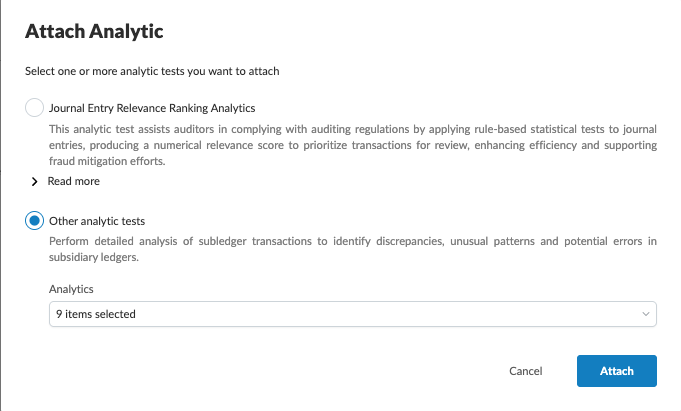
In the Attach analytics dialog, select the analytics you want to attach:
-
Select Journal Entry Relevance Ranking Analytics to attach JERR tests.
-
Select Other analytic tests to attach additional journal entry tests or subledger analytics, then select the individual tests you want to attach.
-
-
Select Attach.