
Create an Issuance Transform rule (ADFS)
Create an Issuance Transform rule to map LDAP attributes to outgoing claims.
To create an Issuance Transform rule:
-
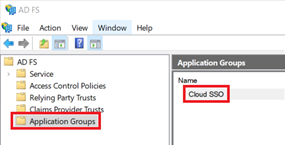
In the ADFS Administration Console, click the Application Groups folder, then double-click your new application group.
-
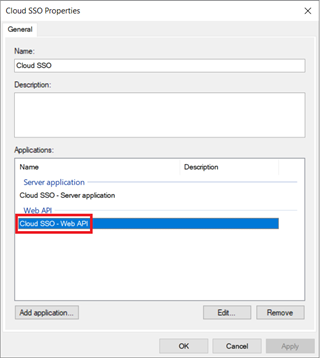
In the Properties dialog, double-click the Web API application.
-
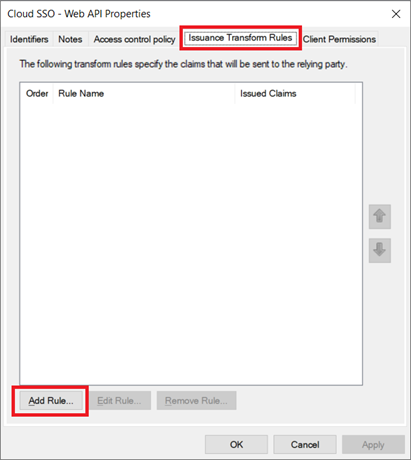
In the Web API Properties dialog, click the Issuance Transform Rules tab, then click Add Rule.
-
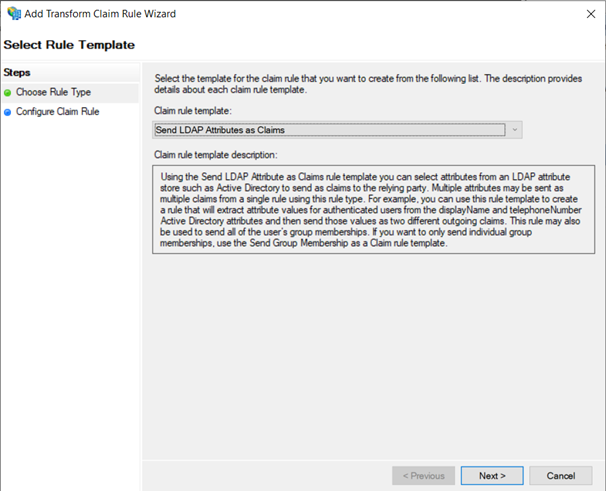
Click the Claim rule template drop-down and select Send LDAP Attributes as Claims. Click Next.
-
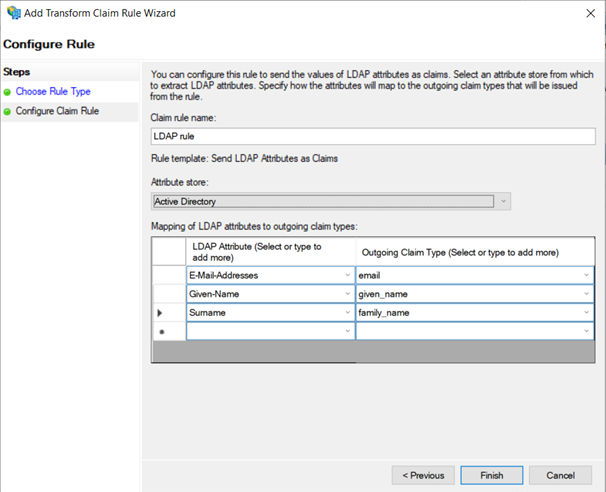
Enter a claim rule name, then click the Attribute store drop-down and select Active Directory.
-
Complete the Mapping of LDAP attribute to outgoing claim types table as follows:
LDAP Attribute Outgoing Claim Type E-Mail-Addresses email Given-Name given_name Surname family_name -
Click Finish to complete the configuration.