
What's new - Working Papers 2022
The following describes the features and fixes included in Working Papers 2022 and related products.
Features
Automatic documents
-
Added the Context selector to uncorrected misstatement type documents in consolidated files. Users can select the entity within the consolidated entity structure as context for the document.
Hybrid Cloud
-
Documents can now be assigned multiple Queries Author IDs, separated by a comma or semicolon. As a result, users can download multiple query documents to the same location in the Document Manager when clicking Cloud | Receive.
-
When integrating Working Papers with a Cloud site, URLs containing the web protocol (http:// or https://) no longer prevent integration until they are manually removed. The web protocol is now automatically truncated from the URL.
-
Added support for the Microsoft Accounts browser extension. User credentials from the extension can now authenticate access to content in Working Papers.
IDEA integration
-
IDEA SmartAnalyzer and IDEA projects are now accessible from the Working Papers ribbon. Users can initiate SmartAnalyzer tests within Working Papers to incorporate analytics into their engagement workflow. For more information, visit idea.caseware.com.
Note: These features require IDEA version 12.1 or above on the same workstation as Working Papers.
Imports and exports
-
Working Papers now supports imports from the following software packages:
-
MYOB AccountRight Live 2021.4
-
QuickBooks 2021 (USA)
-
QuickBooks 2022 (Australia, Canada, UK, USA)
-
Sage 50 Accounting 2022 (Canada)
-
Sage 50 Accounts 2022 (UK)
-
-
Working Papers now supports exports to the following software packages:
-
ProFile 2021 (Canada)
-
-
Increased the number of configurable role sign-offs when converting a CCH engagement to Working Papers from three to five.
-
Added an option to exclude purchase ledger information from Sage 50 general ledger imports to prevent the duplication of purchase transactions in some files.
Fixes
CaseView
-
Fixed an issue where opening an adjustment in CaseView would cause the active user's initials to override the creator's initials.
-
Fixed an issue where embedded images sourced from other CaseView documents would fail to load and report an error that the image must be converted to a non-embedded image.
-
Fixed an issue where some notes in the reference column of the balance sheet displayed in the wrong order.
-
Fixed an issue where using Find and Replace to replace a body of text with a shorter piece of text resulted in an error.
-
Fixed an issue where users could only edit Form Mode documents if they had edit permissions for Design Mode documents.
-
Fixed an issue in certain CaseView versions that prevented users from saving documents as PDFs if the documents contained cells with characters from multiple languages.
-
Fixed an issue where the Include External Documents option would not work correctly if exporting documents to Inline XBRL using a script, rather than the Export Inline XBRL Document dialog.
Hybrid Cloud
-
Fixed an issue where performing a year-end close and roll forward on a file that is both Cloud-integrated and published would not roll forward contact information to the next year's file.
-
Fixed an issue where local computers were not scanned for sufficient disk space prior to downloading large sync copies, resulting in an error and partially downloaded files. Insufficient disk space will now prevent the file from downloading.
-
Fixed an issue in certain Working Papers versions that caused files to be downloaded a folder level above their intended destination.
Imports
-
Fixed an issue where the active period of AccountView imports would default to yearly, even when it was not applicable.
-
Fixed a compatibility issue that prevented users from completing imports from E-conomic Online Accounting and Sage One Accounting.
-
Fixed an issue where Xero imports would not include the journal descriptions of bank general ledger details.
Interface
-
Fixed an issue where the registry repair prompt that displays after installing Windows updates would not correctly repair the registry and would prevent users from accessing Working Papers and Connector.
-
Fixed an issue where converting a sync copy to a newer version of Working Papers would result in both the converted and unconverted copies displaying in the Recent Files pane.
-
Fixed an issue where files recently published and synchronized with Cloud would display as not fully synchronized in the Recent Files pane.
-
Fixed an issue where highlighted text in PDFs would not display correctly when viewed using the internal viewer.
-
Fixed an issue that caused Working Papers to crash or display visual errors if QuickBooks was also operating.
Note: An updated component is available for this issue. Contact Support to request the component.
Issues
-
Fixed an issue where new document issues were created with the Roll Forward and Retain on Cleanup options automatically enabled.
Tax
- Fixed an issue where tax codes K21L1 and K21L2 from the 2021 US Tax update were not included in the accumulated income fields.
Users and groups
-
Fixed a synchronization issue that prevented new users from displaying in the Active Directory group they were assigned.
-
Fixed an issue where a number indicating a duplication was appended to some user names after synchronizing with an Active Directory group.
-
Fixed an issue where disabling LDAP integration in one group for a user who is in multiple groups would cause the user to be flagged as Inactive.
What's new - Working Papers 2022: Update 1
The following describes the features and fixes included in Working Papers 2022: Update 1 and related products.
Features
Cloud integration
-
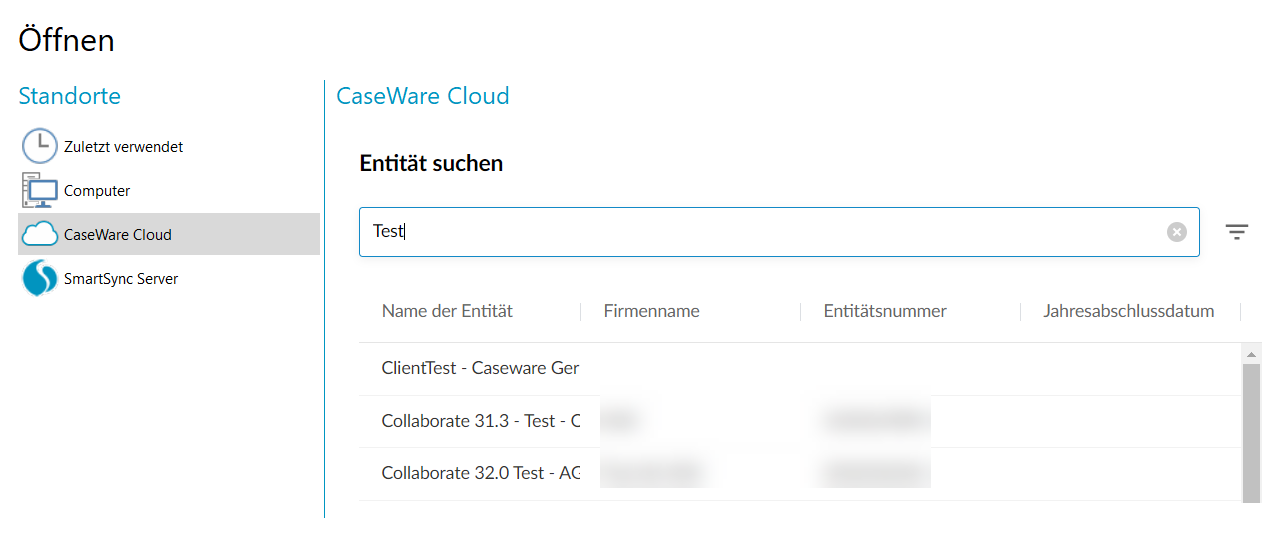
Hybrid Cloud firms can now access their Cloud-integrated engagement files from the new Caseware Cloud menu on the Working Papers File | Open page. This functionality is no longer combined with the SmartSync Server menu. You can search through and filter your firm's entities, then select an entity to view the associated engagement files. Opening an engagement file from this interface automatically checks out a local sync copy to your computer.
IDEA integration
- There are no changes to Working Papers regarding IDEA integration; however, updates to IDEA will add functionality to SmartAnalyzer apps that will be accessible within Working Papers.
Imports
-
Working Papers now supports imports from the following software packages:
-
Palladium 2017
-
QuickBooks 2023 (Australia, Canada, UK, USA)
-
Sage 50 Accounting 2023 (Canada)
-
-
Xero imports now include general ledger descriptions for cash flow items.
Fixes
-
Fixed an issue that allowed users to delete milestones in previously locked-down engagements using CaseView.
-
Fixed an issue where insignificant XBRL data was being stored in CaseView documents and caused performance issues in the Knowledge Library.
-
Fixed an issue where copy and pasting text from a Word document on Microsoft OneDrive to a CaseView document would cause CaseView to stop responding.
-
Fixed an issue that prevented users from connecting to shared stores through Working Papers if they were created in a version of SQL Server that is no longer supported.
-
Fixed an issue where Working Papers would stop responding after adding a file with a long file path to the Document Manager.
-
Fixed an issue where all the documents in a query would download to the same placeholder location, regardless of the Author ID they were assigned.
-
Fixed an issue where the sent date and signed-off date of documents with an electronic signature would use a default setting and ignore the system's assigned date and time format.
-
Fixed an issue where Working Papers would stop responding upon launching QuickBooks.
-
Fixed an issue where Working Papers 2021 would not be removed when performing a silent installation of Working Papers 2022.
-
Fixed an issue where files with names containing accented characters did not automatically open when downloaded from the new Caseware Cloud menu on the File | Open page.
-
Fixed an issue where a silent crash would prevent milestones from being created during a file lockdown. This silent crash could occur if the file contained an automatic document that was utilizing the GetIdentification function.
What's new - Connector 2022
The following describes the features and fixes for Connector 2022.
Features
- Added support for Working Papers 2022 files.