
What's new - Working Papers 2020
Take your engagements further with Working Papers 2020. Explore all the new features in this version, including enhancements to Cloud integration, engagement efficiency, and much more.
Integration with AnalyticsAI
Working Papers now integrates engagement files with AnalyticsAI. Firms can improve their audit process by creating AnalyticsAI engagement files directly from Working Papers, uploading trial balance data, and incorporating reports based on specific tests back into Working Papers.
Integration with multiple Cloud sites
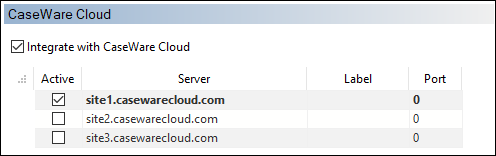
We’ve added support for integration with multiple Cloud sites. Users can now save the details of multiple sites and easily switch between them from the Options dialog. Note that for security reasons, login credentials are cleared when you switch sites.
Single sourcing Engagement Properties with Cloud
Cloud-integrated files now single source Engagement Properties, including contact information, from Cloud. When integrating a file with a Cloud entity, the Engagement Properties will automatically populate with the properties from Cloud. This ensures that the engagement files for each client are consistent and saves you the effort of filling out client information manually.
Bulk property changes to automatic documents
The properties of leadsheet/grouping, tax reconciliation, and trial balance documents can now be modified simultaneously if all documents share the same type and format.
Cell action to publish data to the trial balance
CaseView cell values can now be published to the trial balance to support note details in consolidated files. Create an event cell with the Move to Performance Measures action to push the value of a tagged cell to the performance measures database.
General enhancements
CaseView
-
Merged pages are now retained in the Print Preview dialog upon closing the preview. To unmerge pages, simply right-click the merged pages and select Remove this merge group, or close the CaseView document.
-
Numbered list items that are separated by a bullet list or paragraphs now retain their numbering. Added the option to restart the numbering of a numbered list.
-
Multiple document references can now be added simultaneously, similar to Working Papers. You no longer need to add references one at a time in a CaseView document.
Documents
-
Added a Delivered Date property to automatic documents that allows you to track the date when a document deliverable has been sent to a client. A column has also been added to the Document Manager so you can easily view the delivered dates for all applicable documents.
-
Template authors can now add placeholder documents to the Document Manager more efficiently using the Placeholder or New | Placeholder ribbon options.

-
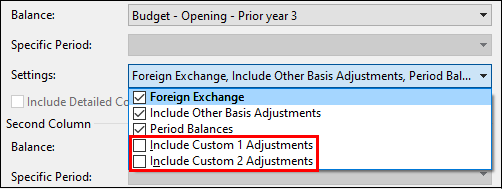
Custom adjustment types can now be included in the balance of user-defined automatic documents to allow for greater customizability.
Imports
-
Working Papers now supports imports from the following software versions:
- Pervasive SQL v.14
- ProSystem fx Engagement 2018, 2019
- QuickBooks 2020 (Canada)
- Sage 50 Accounting 2020 (Canada)
- Sage 50 Accounts 2020 (UK)
-
Improved performance when importing from ASCII and XML files. The overall import time has been reduced.
Issues
-
Issues with multiple issue types now list each type in the Issues pane, rather than stating "Multiple".
-
Issues with multiple issue types will now only roll forward or be retained on cleanup if all other assigned issue types share the same setting. If one of the multiple issue types is set to be cleared, that setting will take precedence when performing a year end close and clean up routine.
Licensing
- A new version of the Network License Server is available for use with Working Papers 2020. Organizations with network licenses must download and install the new version from MyCaseWare to ensure continued access.
Lock down
-
Added China as a jurisdiction in the Engagement Lockdown Wizard.
Mapping and grouping
-
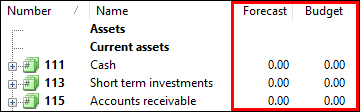
Budget and forecast balances can now display in the Assign Mapping Numbers dialog to improve the mapping process.
SmartSync
-
A list of outstanding sync copies now displays when attempting to rename a traditional SmartSync file. Use this list to determine who needs to delete their sync copy prior to renaming the file.
Tracker
-
Redesigned the Year End Close dialog to better facilitate the bulk year end close and roll forward process.
Fixes
Working Papers
-
Fixed an issue where disabling Allow creation of multiple synchronized copies in a Working Papers file would not prevent users from creating multiple sync copies.
-
Fixed an issue where previewing issues in the Document Manager of a document with more than 86 issues would cause Working Papers to stop responding.
-
Fixed an issue where using Select All in the internal recycle bin would cause Working Papers to stop responding.
-
Fixed an issue that prevented the Freeze function from freezing column headers in certain automatic document types.
-
Fixed an issue where recently accessed files would not display under the Recent tab of the Copy Components Wizard.
-
Fixed an issue where members of multiple Active Directory groups would be removed from all groups if one group was unsynchronized.
CaseView
-
Fixed various scaling issues when viewing CaseView on a 4k display.
-
Fixed an issue where text could not be selected backwards when editing an input cell in Form Mode.
-
Fixed an issue that duplicated the last page when viewing a print preview in Wide Table mode.
-
Fixed a scrollbar sizing issue when viewing a print preview.
-
Fixed an issue that caused Fit to Screen to fail when viewing multiple documents in print preview mode.
-
Fixed an issue that caused a value to multiply by 100 when copied from a numeric cell and pasted into another.
-
Fixed an issue that caused the Quick Access Toolbar (QAT) to return to the default position after selecting Enable Multiple Document Windows.
What's new - Working Papers 2020: Update 1
Bring more data into the CaseWare ecosystem with new import enhancements in Working Papers 2020: Update 1.
ASCII and Excel import enhancements
We’ve reduced the amount of time it takes to import large ASCII and Excel file types into Working Papers by 30%. This estimate is dependent on your hardware configuration and may be affected by the storage location of your files.
AnalyticsAI file deletion after year end close
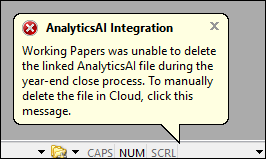
An error message now displays if the year end close process fails to delete an associated AnalyticsAI file. If you receive this error, you’ll need to manually delete the AnalyticsAI file in Cloud.
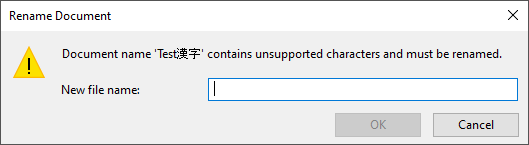
Document Manager rename prompt
When adding a document that contains unsupported characters in the file name to the Document Manager, a prompt now displays to rename the document.
General enhancements
Imports
-
Working Papers now supports imports from Sage 50 2021 (USA).
-
Updated the AuditFile XML import to the 3.2 standard. This update should resolve recent compatibility issues.
-
Updated the SAF-T PT XML import to align with new tax authority changes in regards to transaction dates.
-
Updated the Cloud Import Utility to support imports from the latest software versions.
SQL Server
-
Added support for SQL Server 2019.
Fixes
Working Papers
-
Fixed an issue that prevented parent files on SmartSync Server from being renamed through a child copy in Working Papers.
-
Fixed an issue that prevented the trial balance of a Dutch language Working Papers file from being uploaded to AnalyticsAI.
CaseView
-
Fixed an issue where scripts that run upon opening a CaseView document would fail if Multiple Document Windows was enabled.
What's new - Working Papers 2020: Update 2
Improve your workflow with the latest fixes in Working Papers 2020: Update 2.
General enhancements
Imports
-
Working Papers now supports imports from Sage 50 Accounts 2021 (UK).
Fixes
Working Papers
-
Fixed an issue where attempting to sign off a document from the Audit template ribbon could cause CaseView to close unexpectedly.
-
Fixed an issue that would add a blank issue to the Issues pane upon changing tabs or opening a Working Papers file.
-
Fixed an issue where ASCII imports would fail if another instance of Working Papers or specific CaseView documents were open.
-
Fixed an issue where attempting to import data from Adagio Ledger would cause Working Papers to stop responding.
-
Fixed an issue where adding adjustments to an adjusting journal entry while using a window layout template (Tools | Options | Layout) would cause Working Papers to close unexpectedly.
CaseView
-
Fixed an issue where an error message about activity in other document windows would display instead of the necessary dialog to perform various CaseView actions.
-
Fixed an issue where bulleted and numbered lists would be removed from content when inserted into a document from a Knowledge Library.
-
Fixed an issue where opening an automatic document using a cell event would display the document without any mapped accounts.
-
Fixed an issue where a function that determines the integrity of merged pages would cause performance issues when printing large CaseView documents. The function is now only used for documents where merged pages are present.
What's new - Connector 2020
The following describes the features and fixes for Connector 2020.
Fixes
-
Fixed an issue that caused Connector formulas to display as #NA upon closing the Excel document.
-
Fixed an issue where clicking a document reference in Excel would open a document from the incorrect Working Papers file if more than one file was open.