
Plug-Ins
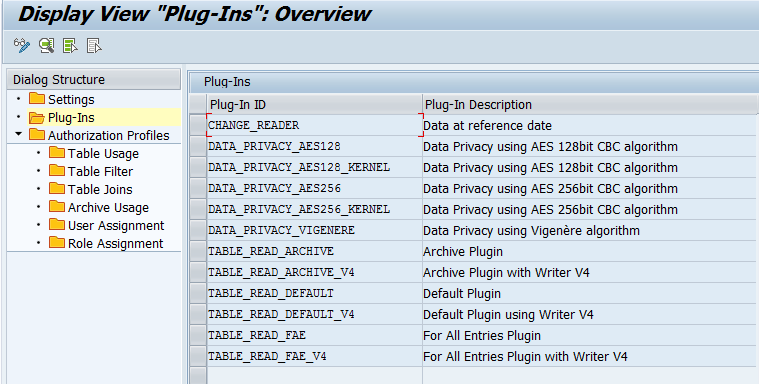
To use the join feature also for cluster and pool tables, enable access to archived data and anonymize or pseudonymize data via Data Privacy, the implementation is carried out in Plug-In classes.
During the installation process the required standard components Plug-Ins are installed.
Important note:
If you make changes here, this could impair the functions of SmartExporter. Especially, the Plug-In ID and the Plug-In Class must not be changed.
After selecting one or several Plug-Ins you can switch to the detailed view using the Details  icon.
icon.
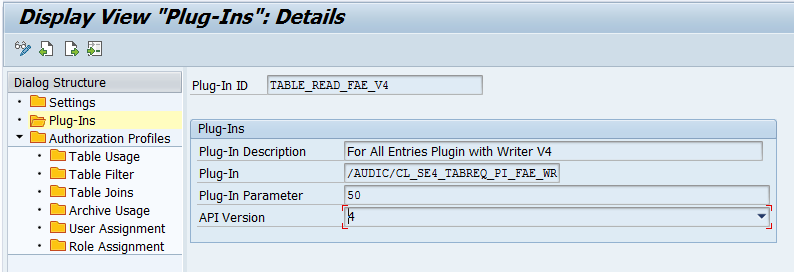
Due to performance reasons it may be necessary to change the value for the Plug-In Parameter field for the Plug-Ins with the IDs TABLE_READ_FAE and TABLE_READ_FAE_V4. High values may result in an increased need for storage space and long ABAP runtimes, whereas small values may cause long runtimes due to numerous database accesses. The optimal value depends on various factors and has to be determined individually. So far a value of 50 is preset for the installation and has proven to be practicable.
When configuring the archive plug-ins the Plug-In Parameter field defines which implemented class will be used to evaluate the archive index.
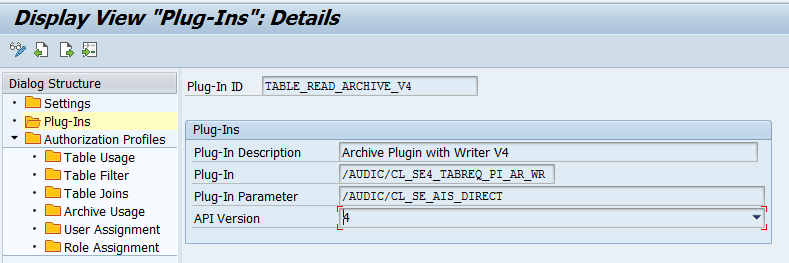
The current version only supports the /AUDIC/CL_SE_AIS_DIRECT class for the analysis of the SAP® AIS indexes.