
Scope of Delivery
Please select your SAP® base release to display the correct paths and file names.
Paths and file names depending on the SAP® base release used:
For the SmartExporter SAP® components version 7.0.0000 or higher the Add-On and the transport will be shipped in two different versions for the SAP® base release 700 and higher: one version for SAP® base releases 700 to 740 SP7 (in the subfolder 700 in the download package) and one version for SAP® base release 740 SP8 or higher (in the subfolder 740). The reason for this is that the implementation of the storage locations for SAP® base releases lower than version 740 SP8 are not supported for Azure services.
To not impair the readability of the help topics, all topics with version specific paths or file names contain a drop-down list at the start of the topic. After switching to your SAP® base release in this drop-down list, all paths and file names will be shown in the correct form throughout the topic.
Do you need any help checking your SAP® base release?
The software will be delivered on a data carrier or via download package. The download package includes the SAP Components\SmartExporter SAP Components directory with the following content:
-
SAR and PAT files in the version directories AddOn\740\DATA
SAR and PAT files in the version directories AddOn\700\DATA
-
Support packages as SAR and PAT files in the version directories AddOn\740\PATCHES
Support packages as SAR and PAT files in the version directories AddOn\700\PATCHES
- SAP® certificate in the AddOn\SAPCertificate folder
The folder structure is shown in the following figure.
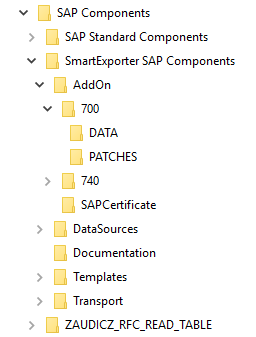
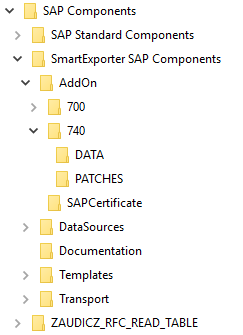
In the DATA and PATCHES directories you find the installation files. (XXX represents the current version number of the Add-On, e.g. 700.)
|
ASE_XXX_740.SAR | ASE_XXX_700.SAR |
Installation package |
|
ASE_XXX_740_ACP_NNN.SAR ASE_XXX_700_ACP_NNN.SAR |
Attribute Change Package for the installation package |
|
|
ASE_XXX_740_SPZ.SAR ASE_XXX_700_SPZ.SAR |
(optional) installation patch Z |
|
|
ACG0020980371_NNNNNNN.PAT ACF0020980371_NNNNNNN.PAT |
installation file, patch file and attribute file for SAP BASIS version 740 installation file, patch file and attribute file for SAP BASIS version 700 |
Please refer to the "Readme.txt" file in the SAP Components folder in your download package for the assignment of the PAT files to the various installation, attribute and patch versions. (In case you have downloaded the SmartExporter version, you find the file in the SAP Components folder.)
IMPORTANT NOTE:
- During the installation of the Add-On by means of the SAINT transaction the requirements you have to meet to install the Add-On will be checked.
- Only load the Attribute Change Packages into your SAP® system if the SPAM/SAINT version is 64 or higher.
- If you have installed the Add-On, you must not install a transport request afterwards, otherwise the Add-On cannot be uninstalled from the SAP® system. On the other hand, if a transport request has been installed, an Add-On with the same or higher version can be installed.
The Add-On for SmartExporter requires a specific version of the software component SAP_BASIS.
For all installations of the SAP® Business Suite, such as ERP, CRM, SRM, SCM, the Add-On XXX_740 in the AddOn\740 folder has to be installed.
For all installations of the SAP® Business Suite, such as ERP, CRM, SRM, SCM, the Add-On XXX_700 in the AddOn\700 folder has to be installed.
For all installations of the SAP® technology solutions, such as PI or EP, please install the corresponding transport in the Transport\740 folder.
For all installations of the SAP® technology solutions, such as PI or EP, please install the corresponding transport in the Transport\700 folder.
Run the SPAM transaction, select Imported Support Packages and click the Display button.
A list of the installed support packages is shown for all installed add-ons. Navigate to the support packages for the SAP_BASIS component.
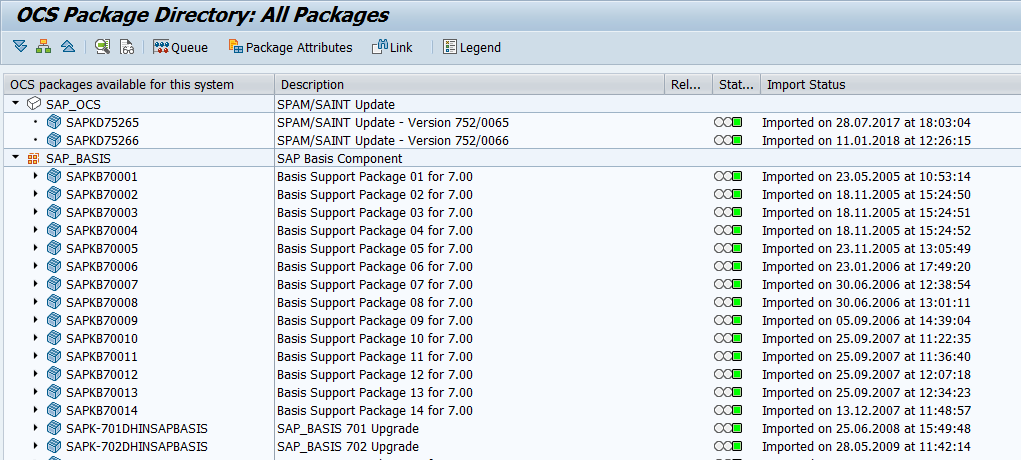
The lowest Basis Support Package indicates which SmartExporter Add-On has to be installed.
| SAPKB70001 | SmartExporter Add-On version XXX_700 |
Please refer to Checking the SAP® base release for a detailed description of how to determine the SAP® base release and which Add-On should be installed.
NOTE:
As an alternative to the transport, the Additional Data Source Reports can also be installed as an Add-On as of SmartExporter SAP® components version 8. The Add-On is located in the ‘SmartExporter SAP Components\AddOn\Report’ directory. This Reports Add-On contains all reports including the generic report call.
The Reports Add-On is located in the /AUDICREP/ namespace.
Unlike the SmartExporter SAP® components Add-On, the Reports Add-On is not certified by SAP SE.