
Deployment of the directDART Additional Data Source
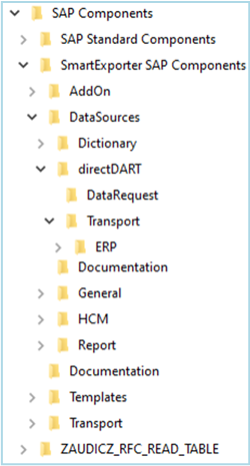
The software will be deployed as download package and contains the following components in the SAP Components\SmartExporter SAP Components\DataSources directory.
-
Data Dictionary files for the SmartExporter Windows client in the Dictionary folder.
Upon installation of a new SmartExporter Windows client, the current Data Dictionaries are installed automatically. Only use the Data Dictionary files from the Dictionary folder if new or updated Additional Data Sources are deployed between two SmartExporter releases.
-
A separate folder directDART for the directDART Additional Data Source. The folder contains:
- A Transport folder containing the transport files
- A DataRequest folder containing Data Request templates for the SmartExporter Windows client
The folder structure is shown in the following figure:
The IS-UT subfolder of the ERP folder contains a transport for segments of the IS-UT (SAP Utilities/Telecommunication) software component. Please also install this transport if you want to extract IS-UT segments. The reason for the separate transport is that IS-UT did not yet exist in older ECC 6.0 releases.