Add
Adds a message to a new anonymous group at the end of the list or to a group with the specified name, or changes the title of a specified group.
Compatibility
Available as of IDEA version 9.1.1
Syntax
Add(message As String, groupTitle As String, groupName As String)
Parameters
message
The message to be added.
groupTitle
An optional group title. The group title is ignored if it is null or empty.
groupName
An optional message group name.
If the group name is null or empty or if it consists only of white-space characters, a new anonymous message group is added at the end of the list but only if the title or the message are not null or empty.
If the group name is not null or empty or if it does not consist only of white-space characters and if the title and the message are not both null or empty, the function will add a new message group with the specified name at the end of the list, provided that there does not already exist one with the same name (the function uses the OrdinalIgnoreCase comparer).
The function adds the message, if not null or empty, at the end of the list of messages of the target group (i.e. the newly added group or the one with the specified name) and sets the title of the target group if the specified title is not null or empty.
Example
Option Explicit

'messages, IMessagesCollector

Sub Main()

	Dim oMessages As Object
	Set oMessages = SmartContext.Messages

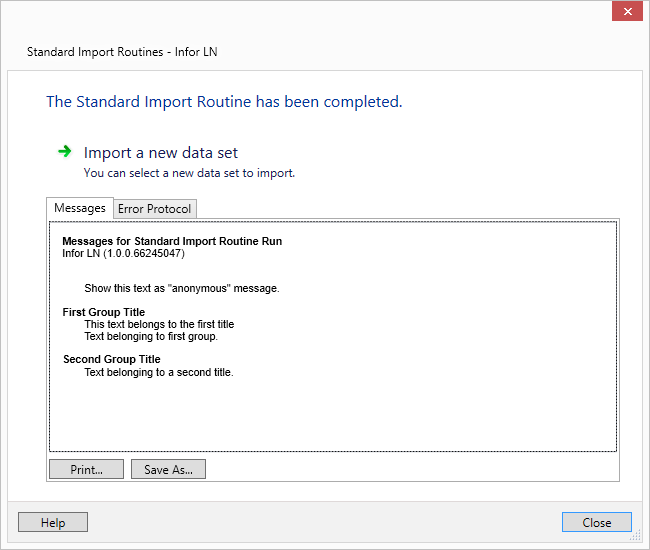
	'Add - Adds a message to a new anonymous group at the end of the list or to a group with the specified name, or changes the title of a specified group.
	oMessages.Add "Show this text as ""anonymous"" message."
	oMessages.Add "This text belongs to the first title", "First Group Title", "FirstGroup"
	oMessages.Add  "Text belonging to a second title", "Second Group Title"
	oMessages.Add  "Text belonging to first group", "", "FirstGroup"

End Sub
Result