
Downloading the updates - Quick Method
Make a backup
Before updating with the Quick Method, make a backup of the Master file(s) (e.g. PACT Compilation Master) and the existing Resource Centre (e.g. PACT Compilation KLIB).
Move your existing PACT Compilation KLIB (Resource Center) directory and PACT Compilation Master file directory to a new folder to archive them (e.g PACT Archive).
Downloading PACT
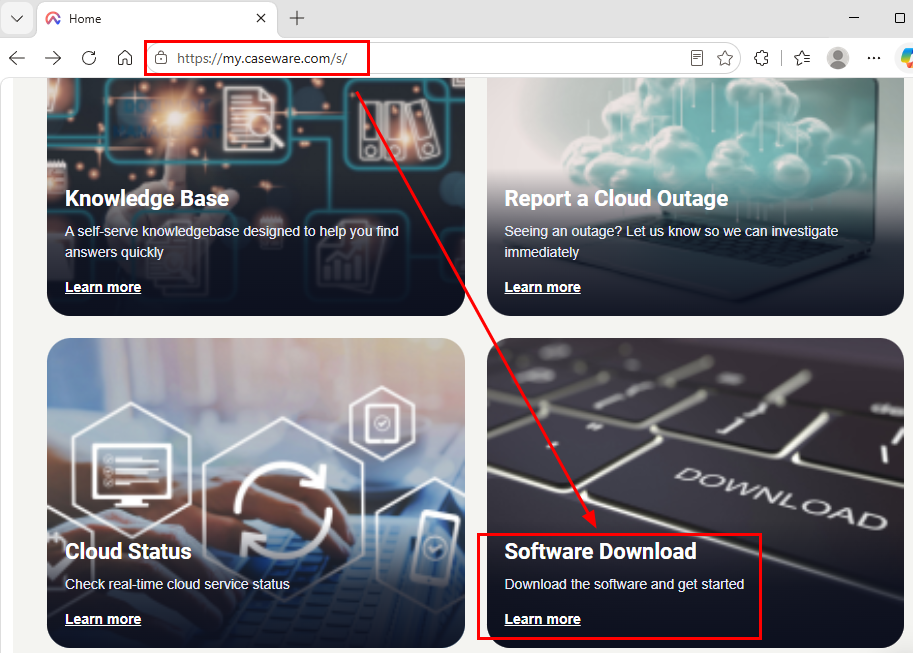
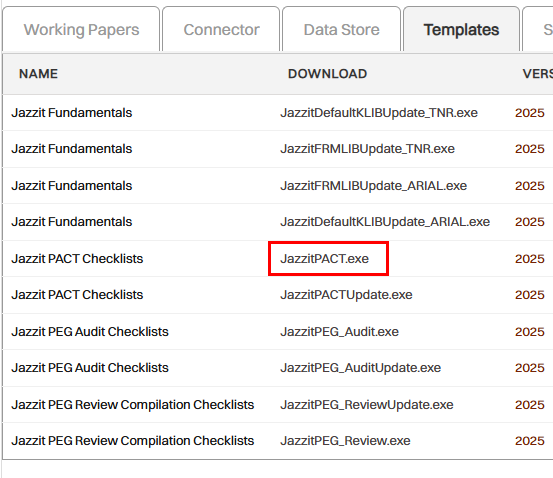
Go to my.caseware.com and log on using your credentials. Click on the button entitled Software Download. You will be presented with all your Caseware subscriptions in tabs. Click on the tab entitled Templates. You will be presented a list of template downloads..
Click on download link for JazzitPACT.exe.
Depending on the browser used, you will be prompted to Run or Save the download as.
-
If you select to save the download, you will need to run the JazzitPACT.exe from the location you saved the file.
-
In some instances the file will automatically download to a windows specified destination, browse to this destination and double-click on the JazzitPACT.exe file to start the installation.
-
Selecting Run will automatically start the installation.
Follow the installation prompts. Save the installation to the same location as the existing Resource Centre and Master files as prompted by the Choose Destination Directory dialog. The previous version of the Jazzit Resource Centre and Master file(s) will be overwritten.

Once complete, your folder structure should resemble this:
