
Working Paper Highlights
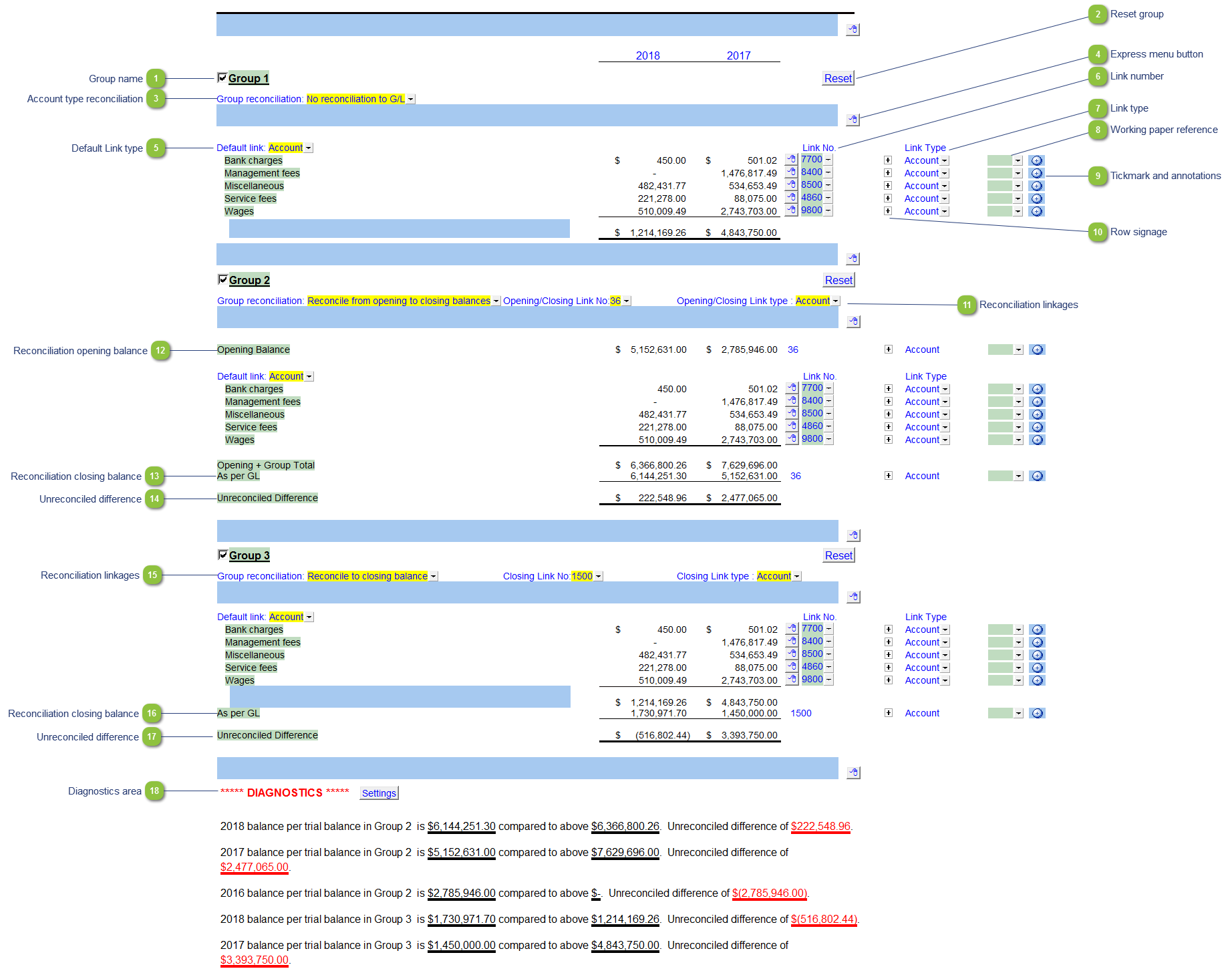
| Number | Name | Description |
|---|---|---|

|
Group name |
Set the name for the group. |

|
Reset group |
Reset the group to default. All values will be cleared. |

|
Account type reconciliation |
Select the reconciliation method for the group:
|

|
Express menu button |
Right-click on the express menu to insert more linked or manual lines, insert subtotals, sort and delete current lines where the options are available. |

|
Default Link type |
Select the default grouping you want to use for the groups linkage. The working paper is defaulted to use the Account link. |

|
Link Number |
The link number indicates which linked number (i.e. map number) the row is linked to. Use the popup menu to select a link number. This can be a map, account or group number depending on the link type selected. Refer to Balance Origins for more information. |

|
Link Type |
The link type is set from the default link type selected. You can change the link type for the individual row item if different from the default link type. |

|
Working paper reference |
Select a working paper reference from the dropdown for the relevant row. |

|
Tickmark and annotations |
Set any tickmarks and annotations for the relevant row. |

|
Row signage |
Set to add or subtract the row from the group total. |

|
Reconciliation linkages |
For the reconciliation from opening to closing balances:
|

|
Reconciliation opening balance |
The opening balance for the general ledger account selected in 11. |

|
Reconciliation closing balance |
The closing balance for the general ledger account selected in 11. |

|
Unreconciled difference |
The difference (if any) between the opening and closing balance. |

|
Reconciliation linkages |
For the reconciliation to closing balance:
|

|
Reconciliation closing balance |
The closing balance for the general ledger account selected in 15. |

|
Unreconciled difference |
The difference (if any) between the group total and the closing balance of the specified general ledge account. |

|
Diagnostics area |
A summary of all unreconciled differences in the groups which are using the option to reconcile. There will also be a note on the Diagnostics Report (JZDIAG) indicating that there are differences in this working paper.
|
