
Callable Debt - Linked to Trial Balance
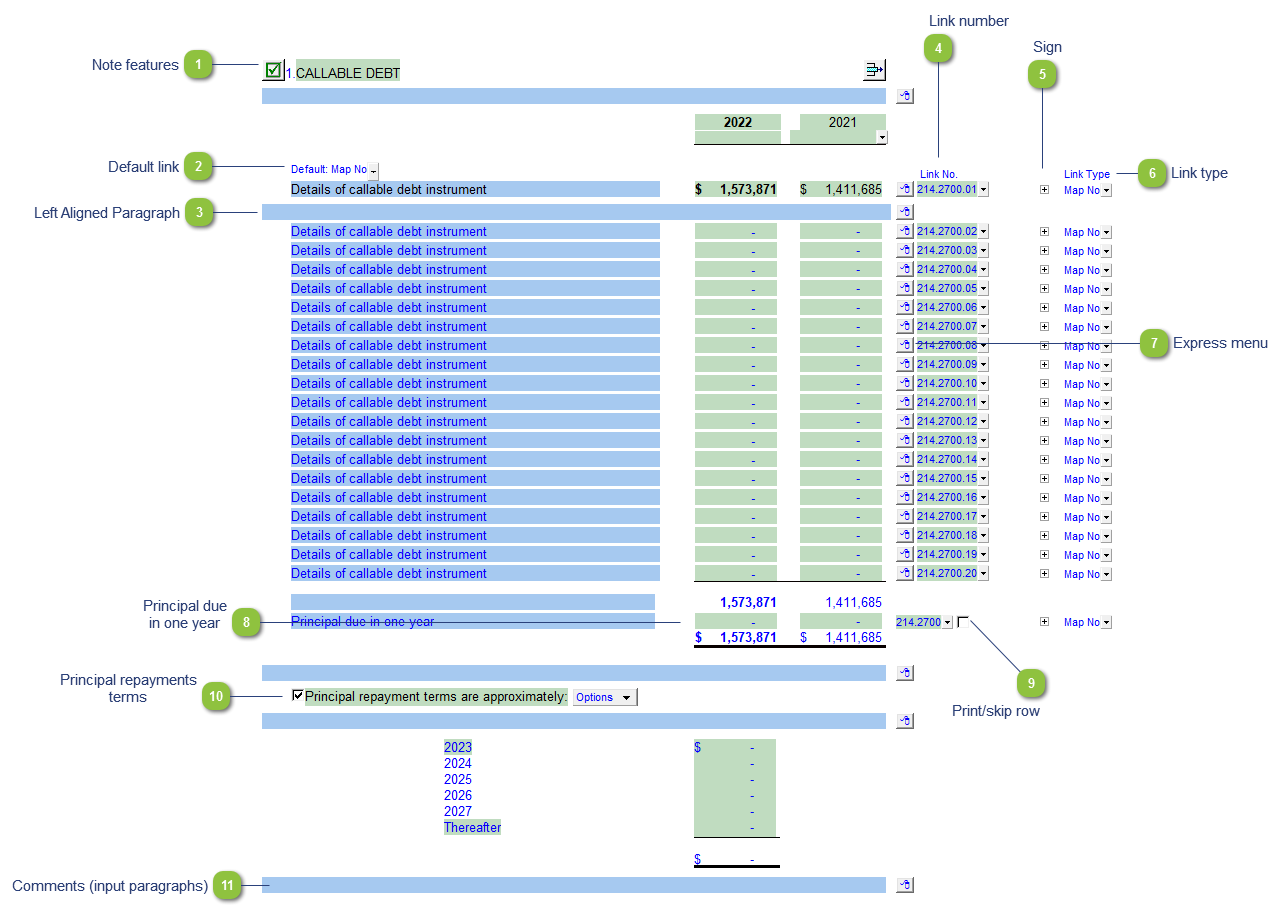
The linked to trial balance note options allows you to link the note directly to the trial balance whether it is via using map numbers, accounts or other groupings. The balances in the note will transfer to the line item on the Balance Sheet.
| Number | Name | Description |
|---|---|---|

|
Note features |
Each note has a series of common features. Refer to Common Note Features for more information on each feature. |

|
Default link |
Select the default grouping you want to use for the note linkage. The note is defaulted to use the Map No link. |

|
Left Aligned Paragraph |
The ability to insert a left aligned paragraph exists in the express menu. |

|
Link number |
The link number indicates which linked number (i.e. map number) the row is linked to. Use the popup menu to select a link number. This can be a map, account or group number depending on the link type selected. Refer to Balance Origins for more information. |

|
Sign |
This allows you to change the sign of the linked rows. Changing the sign will affect the calculation. |

|
Link type |
The link type is set from the default link type selected. You can change the link type for the individual row item if different from the default link type. |

|
Express menu |
Right-click on the express menu to insert more linked and manual lines, insert subtotals, sort and delete current lines where the options are available. |

|
Principal due in one year |
The principal due in one year is linked to the table through the map number (214.2700). This amount will be netted into the balance transferred to the Balance Sheet. Important Note: You will need to have a Current Portion account balance (map no. - 214.2700) and accompanying offsetting account balance (map no. - 214.2700.00) in order for everything to balance properly. Please see technical bulletin JZ135 for more information on presenting current portions in Jazzit. |

|
Print/skip row |
Check off or uncheck the checkbox to skip or hide the total. |

|
Principal repayments terms |
Click on the Checkbox icon to show or hide the principal repayment terms section. Manually enter the repayments amounts into the input cells. |

|
Comments (input paragraphs) |
You can edit existing input paragraphs or insert more paragraphs using the express menu. Refer to Input Paragraphs for more information on inserting paragraphs. |