
KP5 - Other assets note
| Number | Name | Description |
|---|---|---|

|
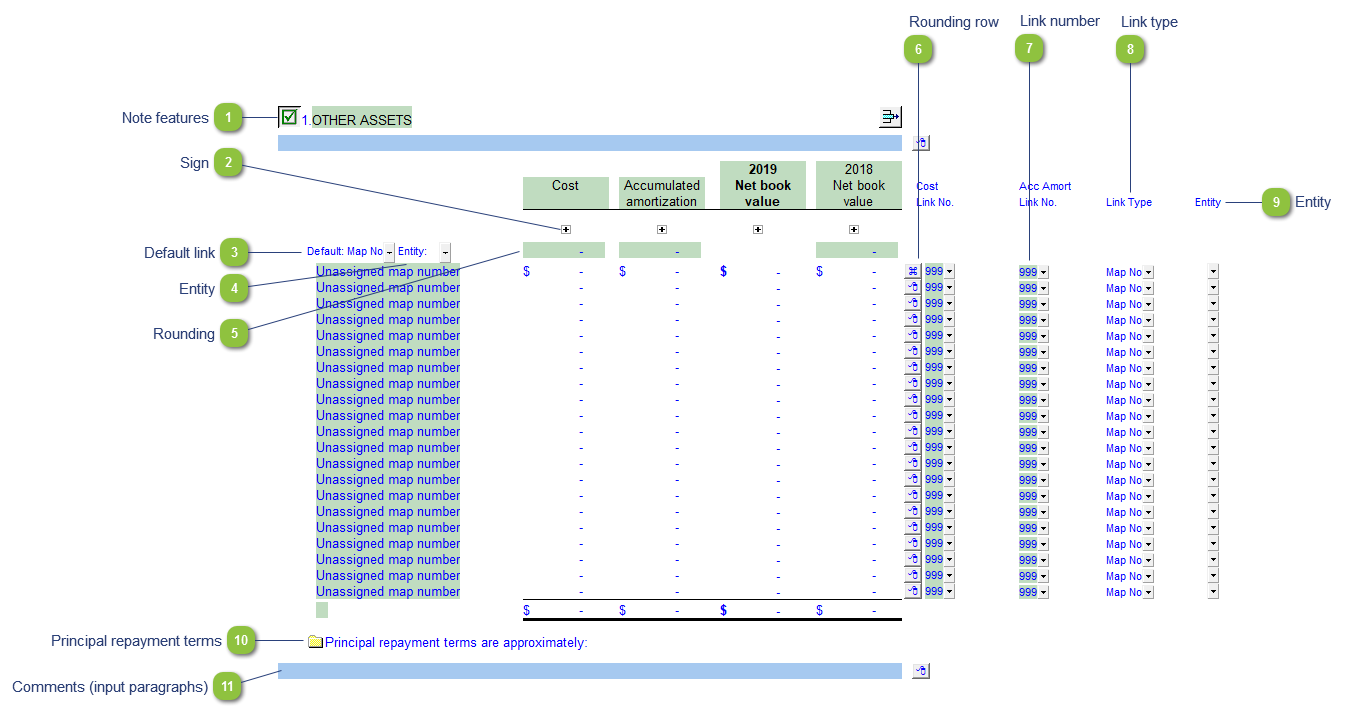
Note features |
Each note has a series of common features. Refer to Common Note Features for more information on each feature. |

|
Sign |
This allows you to change the sign of the linked rows. Changing the sign will affect the calculation. |

|
Default link |
Select the default grouping you want to use for the note linkage. The note is defaulted to use the Map No link. |

|
Entity |
Use the entity popup to select the default for the entity popups to the right. |

|
Rounding |
Type rounding amount to round the note if necessary. The amount is rounded to the designated rounding line as indicated by the |

|
Rounding row |
To apply the rounding difference to a row, select Adjust this row for rounding from the express menu.
|

|
Link number |
Use the popup menu to select a link number. This can be a map, account or group number depending on the link type selected. |

|
Link type |
The link type is set from the default link type selected. You can change the link type for the individual row item if different from the default link type. |

|
Entity |
Use the entity popup menu to select the entity from the list for each row. This will only show the balances associated with the selected entity for that row. |

|
Principal repayment terms |
Click on the folder icon to show or hide the principal repayment terms section. Manually enter the repayment amounts into the input cells. |

|
Comments (input paragraphs) |
You can edit existing input paragraphs or insert more paragraphs using the express menu. Refer to Input Paragraphs for more information on inserting paragraphs. |


Also included: