
Key Performance Indicators Calculations
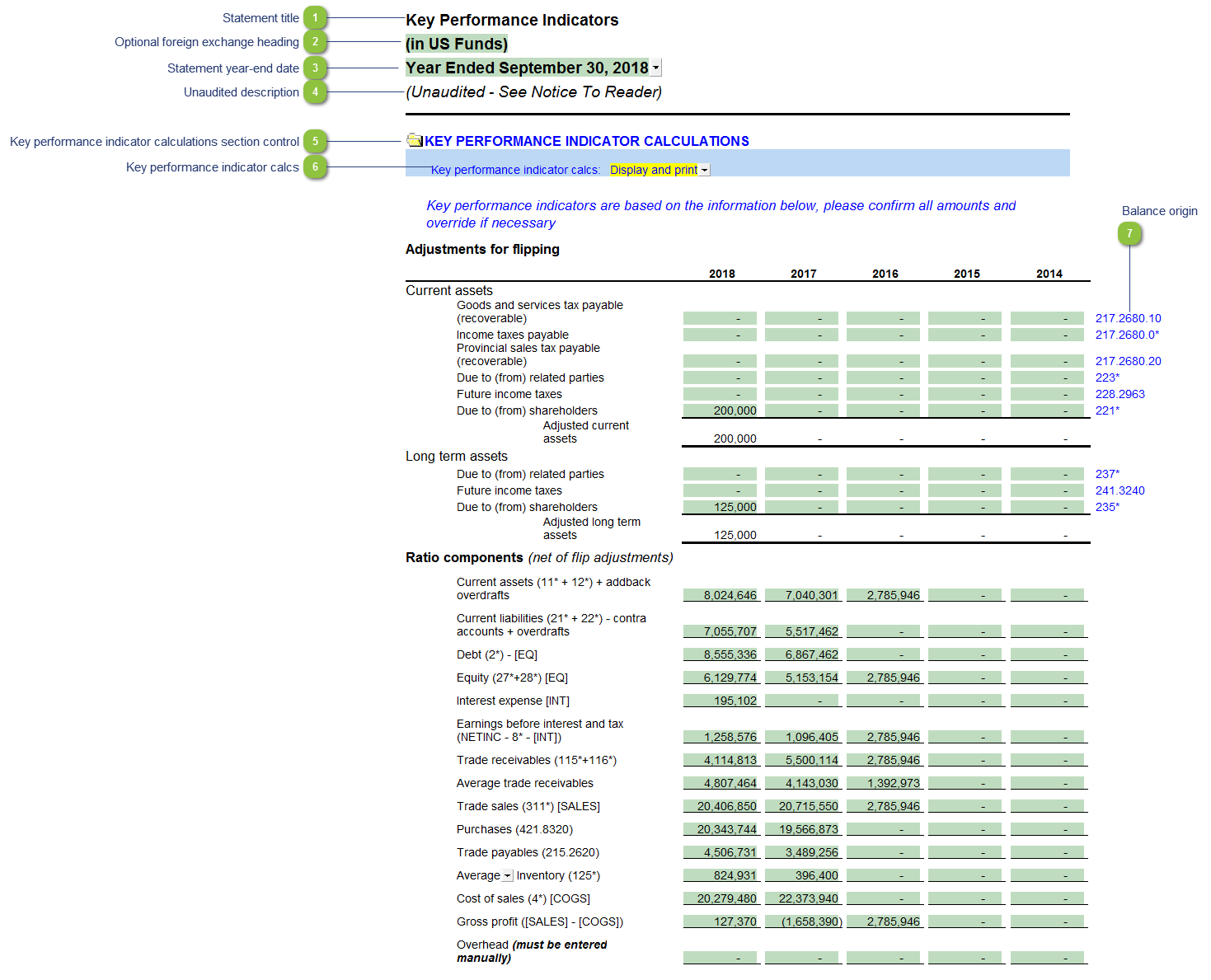
| Number | Name | Description |
|---|---|---|

|
Statement title |
Customizable schedule title which appears at the top of the schedule and on the Index Page |

|
Optional foreign exchange heading |
The foreign exchange heading pulls from the selections made in the Columns section of the Home Menu. Double-click on the cell to jump to the Home Menu. |

|
Statement year-end date |
The statement year-end date is automatically calculated based on the reporting dates set in the Engagement Properties dialog. Use the popup menu to display an alternative date format. |

|
Unaudited description |
The newest Review and Compilation standards no longer require '(unaudited)' to show up in the heading. This can be added back in via the Report alert field in the Engagement Report Options |

|
Key performance indicator calculations section control |
Choose to show (open folder) or hide (closed folder) the section |

|
Key performance indicator calcs |
Choose to only display the calculations section, or display and print |

|
Balance origin |
If you would like to know where a balance is coming from, review the link information on the right side of each line. Refer to Balance origin for more information. |