
Additional Schedule Settings
The Additional Schedules have the same format choices as schedules 1- 20, however, they also have additional settings that do not exist in schedules 1 - 20.
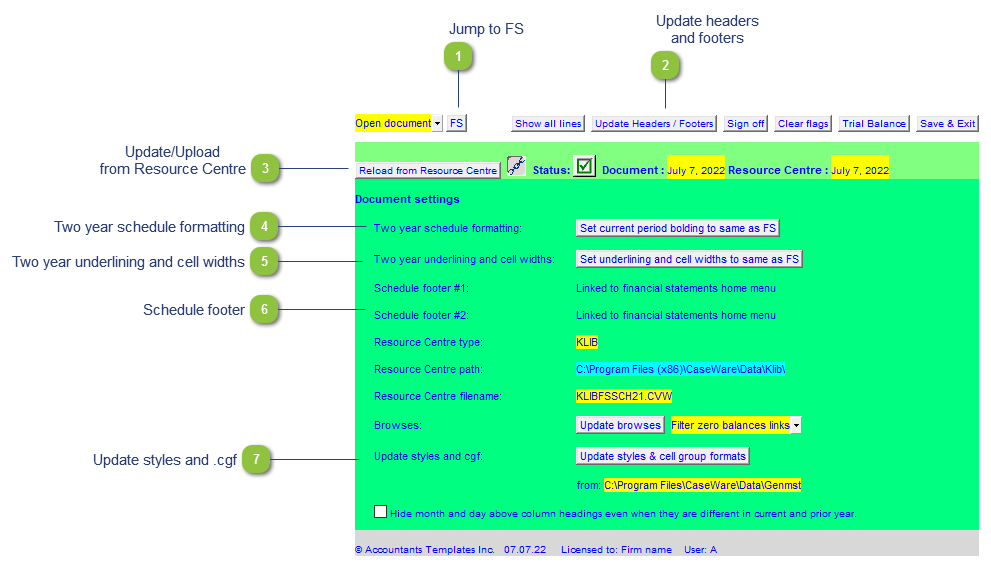
| Number | Name | Description |
|---|---|---|

|
Jump to FS |
Shortcut to jump to the Jazzit financial statements. |

|
Update headers and footers |
Update the headers and footers for the schedules if changes have been made. This is the equivalent of reloading the headers and footers in the Home Menu. This may need to be done after doing the same in the Jazzit Financial Statements. |

|
Update/Upload from Resource Centre |
Additional schedules are updated separately from the Jazzit financial statements. |

|
Two year schedule formatting |
Depending on the schedule format you've selected, you may have formatting options that are shared with the Jazzit Financial Statements. This option reloads the formatting settings from the Jazzit financial statements. |

|
Two year underlining and cell widths |
Depending on the schedule format you've selected, you may have formatting options that are shared with the Jazzit Financial Statements. This option reloads the formatting settings from the Jazzit financial statements. |

|
Schedule footer |
These footers are linked to Home menu > Page Options in the Jazzit Financial Statements. |

|
Update styles and .cgf |
Updates the styles and cell groups from the GENMST. Make sure that your file path is correct. |