
Getting started
Purpose and general overview of the Data Privacy app:
What is the Data Privacy app?
The Data Privacy app helps you protect sensitive data within your IDEA projects or CSV files. It gives you full control to select which fields to protect and how, using various privacy methods including pseudonymization, anonymization, zeroization, and elimination. You can also decrypt fields that were pseudonymized, as long as you have the correct password.
How to launch the Data Privacy app
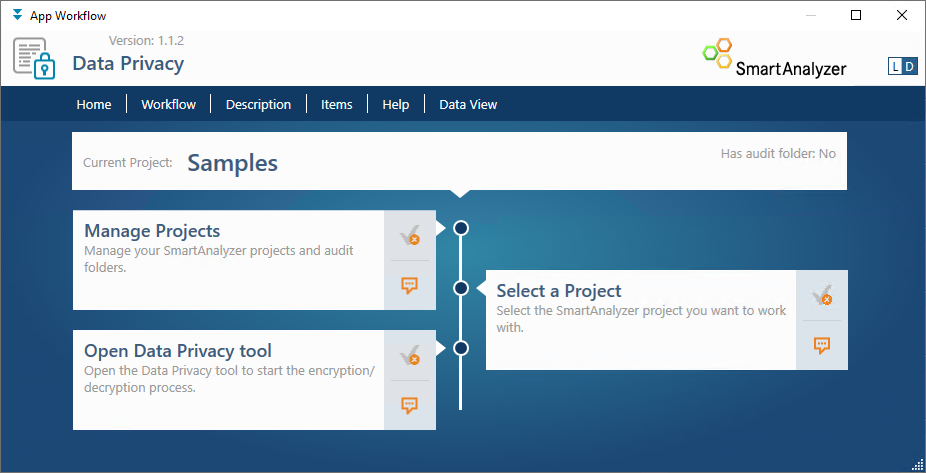
Data Privacy app workflow
-
In the App Workflow, optionally use the Manage Projects and Select a Project steps to manage your SmartAnalyzer projects and select a different one if needed.
-
Click the Open Data Privacy tool link to open the app.
Interface overview
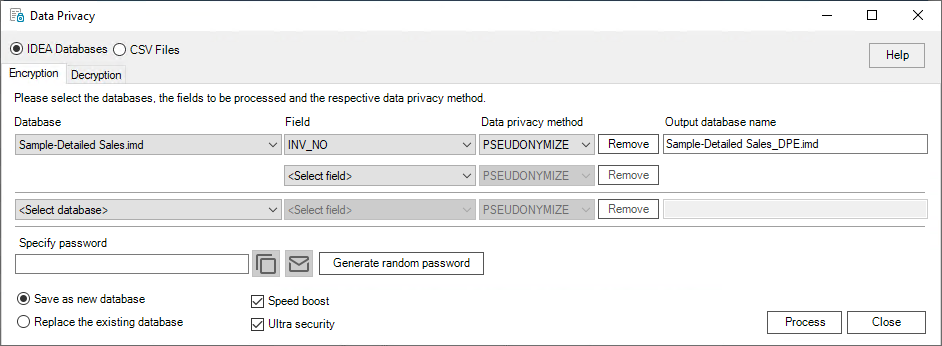
Data Privacy app interface
The app interface has two modes:
- IDEA Databases (selected by default)
- CSV Files
Each has an Encryption and a Decryption tab.