Interface Indicators
Yellow Highlights
Any content that contains a yellow highlight ( ) will accept manually entered text.
Blue Text
Contents that are blue ( )will not print. Use the
  (hide skipped text) button on the Home tab to hide the non-printing text.
Red squiggly underlines
Contents that contain red squiggly underlines indicate a change has been made that affects either the balance or description. Use the  to clear/disable the underlines located in the View grouping on the Home tab.
Red dot
Contents that contain a red dot ( ) indicate where text has changed from the default calculation; usually a result of manually entered text.
Rounding indicators
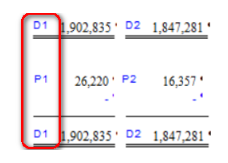
When rounding is applied, indicators show which cells are being compared (D1) and where any rounding differences are plugged (P1). These indicators do not appear when the rounding difference exceeds the rounding tolerance.