
Posting Adjusting Journal Entries
Procedure
- On the Navigational toolbar, click Adj. Entries or from the Account menu, select Adjusting Journal Entries.
- Fill in the applicable fields for your journal entry.
Click an area in the screen shot below to view its description
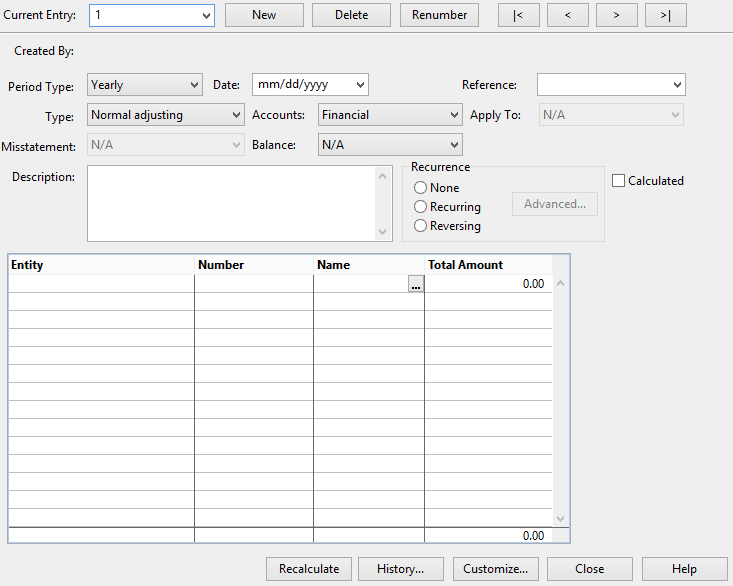
Current Entry
Displays the reference number of the current journal entry being entered or edited.
Tip: Click the menu drop-down button to access a list of existing reference numbers or enter a new reference number.New (Entry)
Creates a new journal entry. Enter the reference number for the new entry in the Current Entry box. The reference number is alphanumeric and can consist of up to 20 characters.
Delete (Entry)
Deletes the current journal entry.
Renumber (Entry)
Renumbers an adjusting entry. The Renumber Entry button becomes available after selecting an adjusting journal entry. The reference number is alphanumeric and can consist of up to 20 characters.
Navigation Buttons
Navigate (
skip to the first ,
previous,
next, and
last journal entries) between adjusting entries. Tip: Pressing the Tab or Enter key will move to the next field.Period Type
Select a period from the available selectors set on the period date sequences in the Engagement Properties Reporting tab.
Date
Displays the date of the journal entry. The date defaults to the end of the current active period. However, for processing multiple periods, the date can be for a prior or future period. If the period date is for a prior period then only the year to date and not the current period financial statement is affected. If the period date is for a future period, the current financial statement is not affected. When moving to this future period, these entries are properly recorded. It can be modified as necessary by typing or selecting a date from the drop-down mini-calendar.
Reference
Select a reference number to reference an adjusting entry to a document in the Document Manager.
Notes:
- This journal entry will not be cross-referenced on that document.
- If you wish to use the individual reference numbers (under customize), leave this field blank. Any data entered here refers to all lines of the journal entry.
Type
Select an entry type from these available types:
Type Description Normal adjusting
Normal adjusting entries update all relevant Automatic documents on the Document Manager such as journals, ledgers, trial balance, financial statements, and leadsheets. When updating from one period to another including a year-end close, these entries are transferred from the adjustment column to the opening or preliminary balance column on the trial balance and leadsheet documents. Other adjusting 2
Other adjusting 3
Other adjusting 2 and Other adjusting 3 are classified as normal adjusting entries. These are used for additional flexibility with booking types enabling the user to customize their names and abbreviations. These entries types will appear independently (separate columns) on the trial balance and grouping automatic documents. For more information on how to create other adjusting 2 and 3 entries, see Creating an Other Adjusting Journal Entry. Reclassifying Reclassifying entries are not recorded in the normal accounting records. However, they are recorded in all financial statements and working papers such as leadsheet documents.
When made in any period other than the last period of the fiscal year, reclassifying entries are excluded from the accounting records. In this case, the entries to non-consolidated balances do not have to be reversed.
Reclassifying entries made in the last period of the fiscal year do get included in the next year's opening balances when either of the following choices is made during a year end close: Update next year's opening balance with consolidated or report. Those reclassifying entries do then have to be reversed.
Unrecorded - factual Unrecorded- factual represent factual misstatements that will not be recorded because of materiality or proposed entries that may be subsequently changed to a normal status.These entries will appear on the Summary of Uncorrected Misstatements Document. Unrecorded - projected Unrecorded- projected represent projected misstatements that are unrecorded based on the auditor’s best estimates of misstatements in populations; usually derived from sampling..These entries will appear on the Summary of Uncorrected Misstatements Document.
Unrecorded - judgmental Unrecorded- judgmental represent judgmental misstatements that are unrecorded based on differences arising from the judgments of management concerning accounting estimates, or the selection or application of accounting policies that the auditor considers inappropriate or unreasonable. These entries will appear on the Summary of Uncorrected Misstatements Document.
Eliminating Eliminating entries are used to prepare combinations or consolidations of divisions or companies. They appear in consolidated trial balances, leadsheets, and financial statement documents.
Note: Eliminating entries in a consolidated file made to a subsidiary entity with a fractional contribution are treated at 100% (the fractional contribution does not apply to eliminating entries).
Tax federal– Federal tax entries adjust the federal tax balance. They are not recorded in the normal accounting records. Use the trial balance, journal, and leadsheet documents to display the federal tax entries.
If creating a Journal - Adjusting journal entries automatic document, any "Permanent" or "Temporary" adjusting entry will be displayed in the "Difference" column of the report.
Tax city– City tax entries adjust the city tax balance. They are not recorded in the normal accounting records. Use the trial balance, journal, and leadsheet documents to display the city tax entries. Tax state– State tax entries adjust the state tax balance. They are not recorded in the normal accounting records. Use the trial balance, journal, and leadsheet documents to display the state tax entries. Other basis Select this format to show other basis adjustment entries. Prior period Prior entries are used to post prior period entries and provide a proper audit trail of such adjustments. Only the year to date and NOT the active period financial statement is affected. If the active period is changed (at a later date) in the Engagement Properties so that the new active period date now includes the prior period date, these entries change to status Normal. Prior means prior period, not prior year. Accounts
Select the type of account that the journal entry affects. Only entries marked Financial will post to normal accounting records. All other types can be used to adjust balances or to add information to the accounts for display, reclassification or information purposes only.
For example, if a client file had a set of financial statements that had to be presented based on both local country accounting standards and IFRS then differing reporting requirements might require information to be classified in two distinct ways. Entries could be booked to separate groupings and reports could be generated from those groupings - without having to formally adjust the trial balance.
Calculations update based on the entries made but the working trial balance itself is not updated. However, any calculations using the Map or group calculations do reflect the adjustments. Available account types are the following:
Financial Select Financial to create entries that adjust accounts in the client's chart of accounts. Cash Flow Select Cash Flow to create entries that adjust accounts on the Statement of Cash Flow. Cash Flow entries are not recorded in the normal accounting records. Performance Select Performance to record activity used in the analysis of performance measures (for example, waste management, employee expenditures, etc.). L/S Select L/S to create entries that adjust accounts on Leadsheet grouping. L/S entries are not recorded in normal accounting records, but they do roll forward on year-end close. Group 1 to 10 Select any Group 1 through 10 from the list to create entries that adjust accounts in any grouping. Grouping adjustments are not recorded in normal accounting records. Mapping Select Mapping to create entries that adjust mapping account balances. Mapping adjustments are not recorded in normal accounting records. To help locate the map numbers, the heading lines from the map setup also display in the drop-down.
See the Apply To option below to apply the adjustment to a grouping.
Tax Export Code Select to create entries that adjust tax export code balances. These are not recorded in normal accounting records.
M3 CodeSelect to create entries that adjust M3 code balances for US tax entities (excluding Non-Profit). These are not recorded in normal accounting records. Notes:
- Adjusting journal entries cannot be posted to calculated map numbers.
- Adjusting journal entries that are posted to a map or group are included in the net income amount for the final balance in the Working Trial Balance.
- Tax entries that are posted to a tax export code or M3 Codeare included in the net income amount for the final balance in the Working Trial Balance.
Apply To
Select the corresponding grouping to create another journal entry with the same amount. Select a group to which the value should apply, or select All to have the value appear wherever any applicable group or tax code balance appears.
Important: This function is only available for Mapping type account.
Notes:- If you delete or modify a line in the adjusting entry of the map number, the corresponding entry in the grouping entry will also be deleted or modified. The corresponding grouping entry can only be edited through the mapping entry.
Misstatement
Select a misstatement type to apply to the journal entry.
Important: This option is only available when the adjusting entry type is set to Normal adjusting, Reclassifying, Eliminating, Tax, or Other basis.
Factual Misstatements where there is no doubt and where supporting documentation is available. Projected The auditor's best estimate of misstatements in populations; usually derived from sampling. Judgmental Differences arising from the judgements of management concerning accounting entries. Balance
Select whether the entry should be applied to the actual (N/A), Budget, Forecast, or any Custom Balance created in the client file.
Description
Enter a description of the journal entry. The description area is scrollable and can be as detailed as necessary. This description field wraps text automatically. Each line of the field can be up to 40 characters long. Press CTRL+ENTER to begin a new line in the Description box. The complete description is printed in the adjusting journal.
Recurrence
Select Recurring to repeat the journal entry over a pattern and range set in Advanced.... Select Reversing to reverse an adjusting journal entry made in the prior period.
Notes: When using SmartSync (i.e. in a synchronized copy of a file), it is recommended that you only modify recurring/reversing entries while Online and that only one person should edit the recurring/reversing entries at a time.Calculated
Select to display a calculation column that can be used to create a calculated adjusting journal entry. Click
to enter a formula to calculate the value to be included in the Amount Field. Calculated entries can be useful for situations such as eliminating entries where users want to ensure the amount being eliminated reflects the most up-to-date value for the account. Note: If all calculated lines in an entry are blank, then this check-box is automatically cleared.Adjusting Journal Entry Columns
Input the adjusting entry data into the available columns to create the adjusting journal entry.
Column Description Entity In a consolidated file, select to apply the journal entry to a specific entity.
Tip: You can right click on this column and select whether to display the entity long name, short name, or both.Number Select an Account Number for posting. Click
display the Quick Lookup dialog. Once the account is located, click the Select button to input the account in the Adjusting Journal Entry Interface.. Notes:
- For consolidated files, the accounts are filtered to display only the accounts that pertain to the current entity selected.
- You can post adjusting journal entries to split-up accounts directly.
- Calculated map numbers are not available for selection.
Name Displays the name of the account number as entered in the trial balance.
To enter an extended description for the adjusting entry, click

Map numbers that have extended descriptions appear as

When an extended description is entered, that description appears instead of the account name in all adjusting journal entries automatic documents except for the general ledger document.
Calculation Click
to enter a formula that will calculate the value to be included in the Amount Field. Calculated entries can be useful for situations such as eliminating entries where users want to ensure the amount being eliminated reflects the most up-to-date value for the account. Note: If all lines in an entry are blank calculation, then this check-box should be cleared.Tax code Select the appropriate tax code for the entry. To activate this column, click the Customize button. For more details, see the Customizing Adjusting Journal Entries Dialog. New Tax codes can also be created by clicking Customize and accessing the Tax Code tab. Debit / Credit This column is hidden by default and is enabled by selecting the Show Debit and Credit columns option in the Customize Adjusting Journal Entries Dialog. If this option is not turned on, only a single Total Amount column is displayed. Cumulative Displays the cumulative balance and represents adjustments for each account for all instances of the recurring entry booked to the current and any prior period.
Cumulative amounts can also be typed into the column and Working Papers calculates the amount in the Total Amount column.
If the Allow Tax Type Posting is selected, then the Total Amount column also are reflected in the Tax Amount and Amount columns for the e
Tax Amount Calculates the tax amount based on the amount and the tax code entered in the tax code column. This column is hidden by default and is enabled by selecting the Allow Tax Type Posting option in the Customize Adjusting Journal Entries Dialog. (Total) Amount A debit amount should be typed with full decimals if necessary.
A credit amount can be preceded or followed by a minus sign and should be typed with full decimals if necessary.
Tip: When inputting large numbers in the journal, there may be a problem with displaying them properly due to their length. Correct this in one of two ways: either change the Working Papers default options (on the Tools menu, select Options, and then click Documents) to display whole numbers only; or change your display font (on the Tools menu, select Font Settings) to be a font such as Arial Narrow to squeeze more characters into the column.Reference Select an individual reference number for each line of the adjusting entry. This column is hidden by default and is enabled by selecting the Allow Individual Reference Numbers option in the Customize Adjusting Journal Entries Dialog.
Annotation This column is hidden by default. To display this column right-click a column and select Show | Annotation. Line annotation added here is shown on the appropriate automatic document. Recalculate
Recalculates all of the calculated adjusting journal entries. This can also be done by selecting Tools | Recalculate Adjusting Entries. For more information on how to create a calculated adjusting entry, see Creating a Calculated Adjusting Journal Entry.
History
Opens the Adjusting Journal Entry History Dialog. This dialog lists all history events for adjusting journal entries and their properties. The properties include the action details, user name and the time of the action.
Click the

button to view more information for the selected adjusting journal history event. This dialog lists the date and time of the event, the name of the user who created or deleted the adjusting entry, and the description of the event. The description includes the entry number and when it was dated. Customize
Opens the Customizing Adjusting Journals Entries dialog to customize the appearance and functions in the adjusting journal entries screen.
Created By
Displays the user name and initials of the person who created the adjusting journal entry is displayed. This is based on the user identification or, if using protection, the user name settings.
Notes:
- Entries showing N/A indicate that the entry was created before this feature was in place.
- To find out how additional details can be tracked, see Tracking adjusting journal entries.
- In the Adjusting Journal Entry worksheet area, Click
in the Number column to open the Type Letters for Quick Lookup dialog and select the account from the list. - In the Total Amount column, enter an amount for the entry. A credit amount can be preceded or followed by a - (minus) sign.
Results
The adjusting journal entry is posted and displayed as an editable entry. Any adjusting journal entry entered will display in the Adjustment column in Trial Balance documents.
Notes
- You can remove a transaction line by clicking once on the transaction line and from the Edit menu, select Delete Line.
- Large numbers may not display properly due to their length. To correct the display problem do one of the following:
- On the Tools menu, select Options, then click Documents. Select the Display Whole Numbers check box; or
- On the Tools menu, select Font Settings and change your display font to a narrower font.
- To make the entry a recurring or reversing entry, select the correct radio button. To modify the pattern of recurrence, click Advanced and select the appropriate options.
- Adjusting journal entries cannot be posted to calculated map numbers.If applicable, click Customize to add any additional options to the adjusting journal entry.
- In a locked down file, only federal tax adjustments can be posted or modified.
- You can post an adjustment to a map or group, but tax amounts are always posted directly to the tax account, rather than to a map or group number. When including tax amounts in any other entry posted to anything other than financial accounts, the Working Trial Balance will be out of balance by the tax amount.