
Accessing financial statement areas
Quick navigational jumps are provided for easy access to different areas within the financial statements.

Prerequisites
To access a financial statement area, you must first open the Financial statements document and select the Navigate tab.
- Viewing a financial statement area
- Jumping to a statement, policy, or note
- Jumping back to a previously viewed statement area
Viewing a financial statement area
In the Financial statements document, you can jump to a specific financial statement area.
Procedure
-
Open the Financial statements document and select the Navigate tab.
-
Click on the
 (Area) drop-down.
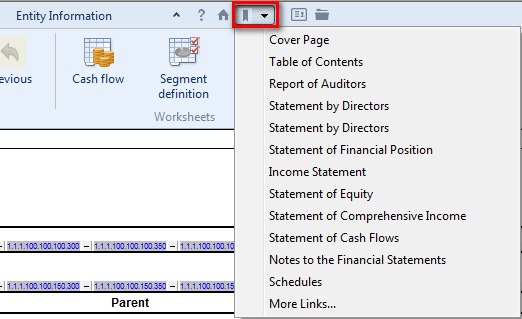
 - Select the financial statement area to view.
Results
The quick navigation button is also available on the main menu line.
Jumping to a statement, policy, or note
Template authors can pre-define relationships between statement line items, policies and notes. If this functionality has been enabled, when you have selected a related item, you can quickly jump to the policy, note, or statement line item.
Procedure
- Open the Financial statements document and select the Navigate tab.
- In the financial statement area, click on the line containing the previously defined jump.
- If a jump to a statement area has been defined, click
 (Statement) to jump to it from the note or policy.
 - If a jump to a policy has been defined, click
 (Policy) to jump to it.
 - If a jump to a note has been defined, click
 (Note) to jump to it.
Results
The specified financial statement area is displayed.
Jumping back to a previously viewed statement area
If you have used the jump feature described above to jump to a related statement, policy, or note, you can go back to the area that you were previously viewing.
Procedure
- Click
 (Previous).
Results
The financial statement area that you were previously viewing is redisplayed.