
ImportParameters
Loads execution parameters from parameters file and assigns them to execution record (association between audit test and IDEA table).
Compatibility
Available as of IDEA version 12.0
Syntax
ImportParameters(filePath As String)
Parameters
filePath
Path of parameters file
Remarks
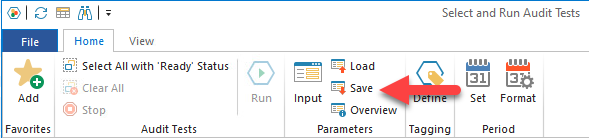
The parameters file has to be created using the Save functionality in SmartAnalyzer (Home tab, Parameters group):
Example
Sub Main()
	Dim SA
	Dim atExecutor
	Dim Tagging
	Dim parameters
	Dim paramCheckBox1
	Dim paramSingleList1
	Set SA = CreateObject("SmartAnalyzer.AutomationClient")
	atId = "f4d65220-77f1-5969-8943-59c7bd448460"
	tblName = "Sample-Weblog"
	' ----------------- Create exec record ---------------------
	Set Tagging = SA.GetTagging(tblName)
	Tagging.SetTag "Comment", "SITE"
	Tagging.Save True
	' ----------------- Import parameters ---------------------
	Set atExecutor = SA.GetAtExecutor(atId, tblName)
	atExecutor.ImportParameters "C:\Data\MyParams.params"
	' ----------------- Get and display new parameters' values ---------------------
	Set parameters = atExecutor.Parameters
	Set paramCheckBox1 = parameters.Get("smartCheckBox1")
	Set paramSingleList1 = parameters.Get("smartSingleList1")
	MsgBox"New value of chexbox1: " & paramCheckBox1.Value
	FOR EACH v IN paramSingleList1.Value
		MsgBox"Next new value of singleList1: '" + v + "'"
	NEXT
End Sub