
Inserting the assertions area
-- User --
To insert the assertions area:
- From the Document Manager, open the work program you wish to edit.
- If the Assertions area is not currently displayed, it can be reinserted, assuming that the content author or your firm is using this area in your firm.
- From the Areas menu at the top of the work program, select Insert List of Assertions.
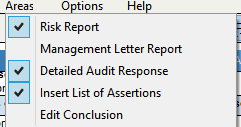
- A checkmark beside the relevant area in the Areas menu indicates that the area will display. To remove the list of assertions, clear the check mark in the Areas menu.
This online help system applies to all Caseware Audit, Review and Compilation products. Not all features are available in all products.