
Management Letter Configure Options
-- Firm Author --
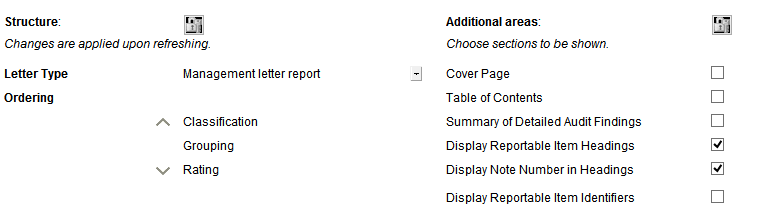
Each letter has the following properties that the author can define:
| Property | Description |
|---|---|
|
Structure |
Click |
|
Letter Type |
Select an applicable letter type. Available types include: Management Letter, Report for those charged with governance, Internal audit. |
|
Ordering |
Click an option and then the up and down arrows to change the ordering sequence. |
|
Additional Areas |
Click to lock areas settings to prevent other authors from performing modifications. to lock areas settings to prevent other authors from performing modifications. |
|
Cover Page |
Select to add a cover page to the Management Letter. |
| Table of Contents |
Select to add a table of contents to the Management Letter. |
| Summary of Detailed Audit Findings | Select to add a summary of detailed audit findings section to the Management Letter |
| Display Reportable Item Headings | Select to display reportable item headings that are selected to display in the Management Letter. For more information on reportable items, see Reportable Items. |
| Display Note Number in Headings | Select to display note number references in reportable items headings. For more information on note number references, see Creating a Cross- Reference Note Number. |
| Display Reportable Item Identifiers | Select to display reportable item identifiers that are selected to display in the Management Letter. For more information on reportable items, see Reportable Items. |
Note: When note number headings are skipped or not displayed, the tabs in the Management Letter will automatically adjust its alignment.
This online help system applies to all Caseware Audit, Review and Compilation products. Not all features are available in all products.