
Start the engagement
To start the audit, you must first create an engagement file.
To create an Audit engagement:
-
In the entity selector, select the entity that you will be auditing.

-
From the Cloud menu (
 ), select Audit.
 -
Select New.
-
Enter a Name for the engagement file. Complete any other optional information and select Save.
-
In the new engagement file, select the engagement name at the top-left to open the Engagement Properties dialog.
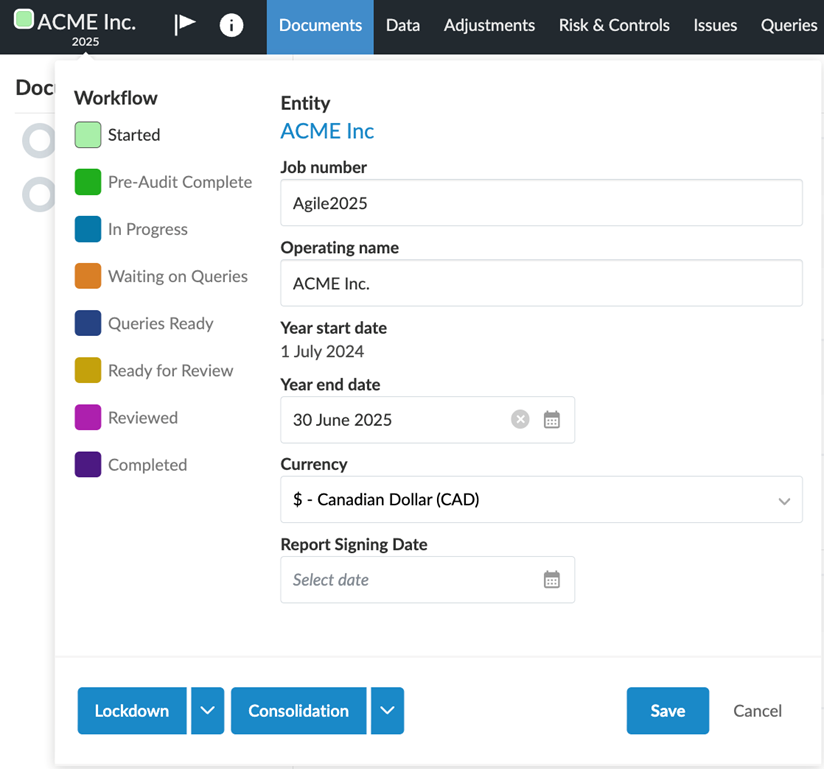
In this dialog, you can modify the workflow status of the engagement, the operating name, year end date and currency. Edit these properties as desired and select Save.
-
New engagement files automatically open to the Documents page. The Documents page initially contains minimal content; more documents become available based on your responses to various procedures and checklists. The Documents page is organised into the following phases, with documents made available based on your responses to the Engagement Optimiser and other checklists:
-
Planning & Risk Assessment
-
Controls Environment
-
Risk Response
-
Reporting
-
Permanent File
-
System documents
-