
Anzeigebedingungen und -beispiele
|
Bedingung |
Parameter |
Beispiel |
|
Risiko wesentlicher falscher Darstellungen (RMM - Risk of Material Misstatement) |
Select an assertion type, a group from the trial balance and one of the following conditions:
If the new risk module is enabled in your product, a difference set of parameters are available for this condition:
Note that the values in the RMM scales list depend on your product setup. |
If Completeness for Cash has No RMM, then show this item. Or, if the new risk module is enabled in your product: If Accuracy for Inventory has RMM less than Medium, then hide this item. |
|
Financial Grouping |
Select a group from the trial balance, specify the year (current or prior) and one of the following balance values:
|
If the balance for the Short term investment account for the Current year is material, then show this item |
|
Antwort |
Select a source document, a procedure in the document and a response for the procedure |
In the 200 Optimizer document, if the response to What is the type of engagement as defined under SSARS21? procedure is Compilation, then hide this item |
|
Konsolidierung |
Specify whether the engagement is Consolidated or Non-consolidated |
If the engagement is Consolidated, then show this item |
|
Skalierung/Rundung |
Select a rounding scale from the drop-down. |
If the rounding is in Millions, then display this item. |
|
Berichtsperiode |
Select the reporting period:
|
If the reporting period is Annual, the show this item |
|
Datum |
Select the nature of the date:
Select the period type options for fiscal year and interim periods within a fiscal year:
Select the mathematical operations used to compare and evaluate (<,>, <=,>=) Select the date |
This item shows if effective date for the year start date is after November 30-2019. |
|
Unternehmenstyp |
Select country and select organization type |
If the entity type is Canadian Private Corporation, then show this item |
| Sprache | Select a content language from the drop-down. | If the content language is French, then show this item.
Note that the content language means the language currently selected in the Engagement Properties popup up. |
|
Group |
Add the conditions in this group Hinweis: All the above condition types are available for you to set up.
|
This item shows if the engagement type is Review and the entity type is Canadian Private Corporation or if the year star date is after October-21-2019 |
| Formularwert |
You can include one or more forms in the condition setup. Select the form name, a field in the selected form and a value for the selected field. The value options for a selected field depend on the field type. For example, numeric fields have logical operators and numerical values, while date fields have a calendar icon for date selection. Hinweis: This condition is only available if you have custom forms in your product. For example, Tax forms.
|
If the field T2S8 in S8 - Capital cost allowance (CCA) form is > 10 or the field T3S8 in S8 - Capital cost allowance (CCA) form is > 10, then show this item. |
Beispiel 1: Eine Bedingung
Die folgenden Anzeigeeinstellungen sorgen dafür, dass ein Dokument angezeigt wird, wenn das Geschäftsjahr nach dem 30. November 2018 beginnt.

Wenn der 20. Dezember 2018 als Jahresbeginn für das Engagement festgelegt ist, wird die Bedingung als wahr ausgewertet und das Dokument ist in der Engagementdatei verfügbar (wird angezeigt).
Wenn der 15. Mai 2018 als Jahresbeginn für das Engagement festgelegt ist, wird die Bedingung als falsch ausgewertet und das Dokument ist in der Engagementdatei nicht verfügbar (ausgeblendet).
Beispiel 2: Zwei Bedingungen
Die folgenden Anzeigeeinstellungen sorgen dafür, dass ein Dokument angezeigt wird, wenn die Sprache des Inhalts Deutsch ist und das Geschäftsjahr nach dem 30. November 2018 beginnt.
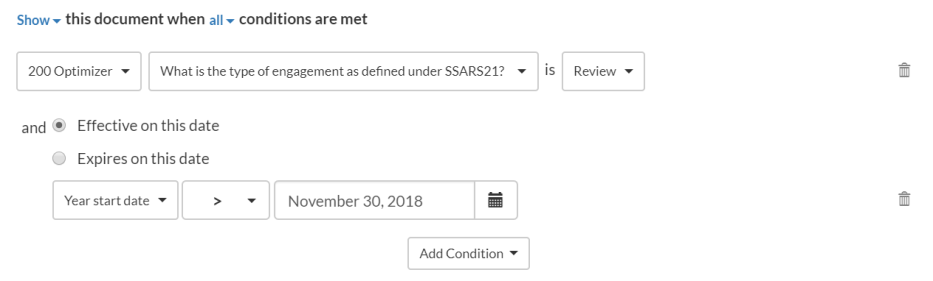
Wenn es sich beim Engagementtyp um eine Zusammenstellung handelt und das Engagementjahr am 15. Dezember 2018 beginnt, ist das Endergebnis falsch und das Dokument ist in der Datei nicht verfügbar (ausgeblendet).
Beispiel 3: Eine Bedingung und eine Gruppe von Bedingungen
Fügen Sie eine Gruppenbedingung hinzu, um eine verschachtelte Konfiguration zu erhalten. Mit einer Gruppenbedingung können Sie mehrere Bedingungen gruppieren und gemeinsam auswerten lassen. Das Ergebnis wird dann mit anderen verfügbaren Bedingungen verglichen.
Mit den folgenden Anzeigeeinstellungen wird ein Dokument verborgen, wenn sich das Engagement in Vorbereitung befindet oder die Entität eine Canadian Private Corporation mit einem Geschäftsjahr handelt, das nach dem 31. Dezember 2018 beginnt.
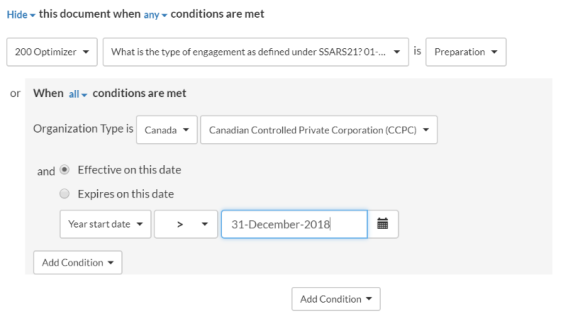
Wenn das Startdatum des Engagementjahres der 20. Dezember 2018, der Unternehmenstyp Canadian Controlled Private Corporation ist und der Engagementtyp Review ist, ist das Endergebnis falsch und das Dokument ist in der Datei nicht verfügbar (ausgeblendet).
Beispiel 4: Zwei Gruppen von Bedingungen
Die folgenden Einstellungen zeigen ein Dokument für Geschäftsjahre an, die nach dem 15. Dezember 2019 beginnen, sowie für Zwischenperioden innerhalb von Geschäftsjahren, die nach dem 15. Dezember 2020 beginnen.

Nehmen wir an, dass der Berichtszeitraum jährlich ist, das Startdatum für diesen Zeitraum der 30. November 2018 ist, der Zwischenzeitraum monatlich ist und das Startdatum für diesen Zeitraum der 30. Dezember 2019 ist.
Das System wertet die erste Gruppenbedingung aus – und das Ergebnis ist falsch, da eine der Bedingungen nicht erfüllt ist. Dann wird die zweite Gruppenbedingung ausgewertet und das Ergebnis ist wahr, da beide Bedingungen erfüllt sind.
Zuletzt werden die Ergebnisse für die beiden Gruppenbedingungen anhand der Anzeigelogik oben bewertet (die besagt, dass das Dokument angezeigt wird, wenn eine der Bedingungen zutrifft) – um schließlich zu dem Endergebnis zu gelangen, dass das Dokument in der Datei verfügbar ist (angezeigt wird).