
What's new - OnPoint Audit 2026.3.0 (v2.2830.0)
Here's a list of what's new in the OnPoint Audit 2026.3.0 release.
Annual content updates
OnPoint Audit checklists and other documents included in this release meet all standards effective for audits of financial statements for periods ending on or after December 15, 2026. This includes SAS 149 – Special considerations – Audits of Group Financial Statements (Including the work of component auditors and audits of referred-to auditors).
SAS 149:
OnPoint Audit now includes a new group audit workbook to help you complete your group audit work in line with the requirements of the new group audit standards. A new guide has also been added to assist you in working through the workbook effectively. New and updated procedures have been included on the existing 2-800 Group audit checklist to reflect the requirements of the new standard.
Download the PDF below to access the guide to help you complete the SAS 149 Group Audit Workbook.
Updated procedures have been added across multiple checklists in OnPoint Audit to reflect the requirements of SAS No. 146 - Quality Management for an Engagement Conducted in Accordance With Generally Accepted Auditing Standards (AU-C section 220). The updated content supports the engagement partner's responsibilities for managing and achieving quality at the engagement level, and appropriate documentation of those responsibilities.
Additional updates have also been made to the 7-300 Engagement quality review checklist to capture the updates of the new quality management standards.
Content enhancements
Content improvements, such as the addition of updated authoritative references, procedures and lightbulb guidance, have been made to the following checklists:
-
1-100 Engagement – Acceptance/Continuance
-
2-610 Minutes of governance meetings
-
2-800 Group audit
-
4-300 Overall audit strategy
-
4-400 Selecting an auditor’s specialist
-
4-500 Team planning discussions – Brainstorming
-
4-900 Planning overview
-
5-115 Test of controls – Revenues receivables receipts
-
5-125 Test of controls – Purchases payables payments
-
5-135 Test of controls – Payroll
-
5-145 Test of controls – Financial reporting
-
5-155 Test of controls – Investments
-
5-165 Test of controls – Inventories
-
B.100 Investments (such as investing excess cash) - Audit procedures
-
7-200 Documentation checklist
-
7-300 Engagement quality review checklist
-
7-800 Reporting checklist
-
8-100 Matters to be communicated to those charged with governance
-
8-800 Audit completion checklist
New Information produced by entity (IPE) forms
OnPoint Audit now includes a new Information produced by entity (IPE) form across all the financial statement areas in the Fieldwork phase. These forms tie back to the respective audit programs, ensuring that all the information provided by your clients has been verified before being used as audit evidence.
Updated financial groupings mapping
The financial groupings in OnPoint Audit now map more accurately into their respective business cycles, associated financial statement areas and the analysis tabs within the relevant audit work programs.
New features and enhancements in Cloud Engagements
Additional document subfolder levels on the Documents page
You can now create subfolders on the Documents page, supporting a folder hierarchy up to 10 levels deep. Previously, folder hierarchies were limited to two levels beneath a phase. Engagements with complex, hierarchical document structures no longer need to flatten their organization into this limitation.
This feature lets you:
Authors
-
Move folders and documents to any valid destination at any depth using the move dialog, with validation that prevents invalid or circular moves.
-
Navigate deeply nested folders using the navigation path, which tracks your scroll position and lets you jump to any level in the path.
-
Find documents faster using navigation panel and search, which now reflect the full folder depth.
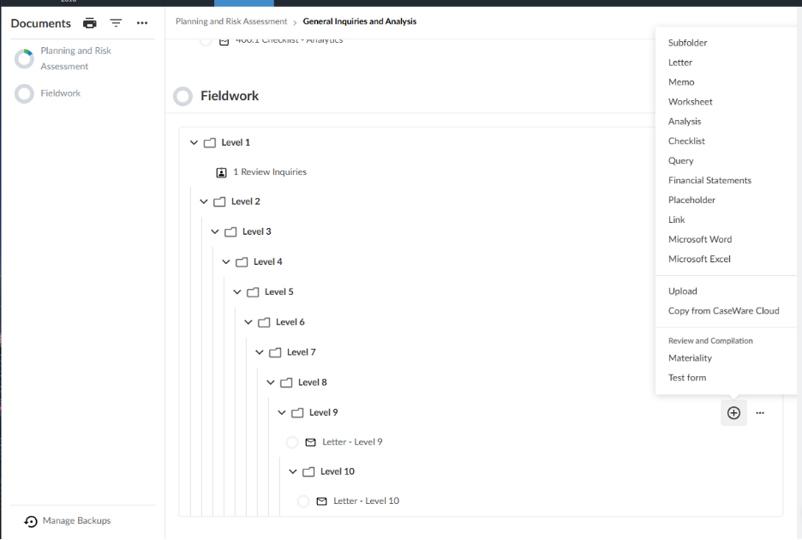
To learn more about the Documents page, see Customize the Documents page.
Control bold formatting at the cell, row and column level in dynamic tables
You can now apply or remove bold formatting on individual cells, rows and columns in a dynamic table. Previously, dynamic tables applied bold automatically to system-designated rows such as Total, Subtotal and header rows. You couldn't change it. You control how text appears in your financial statements to match your firm's formatting standards.
An example of the Edit dynamic table dialog with bold options for a cell and column:
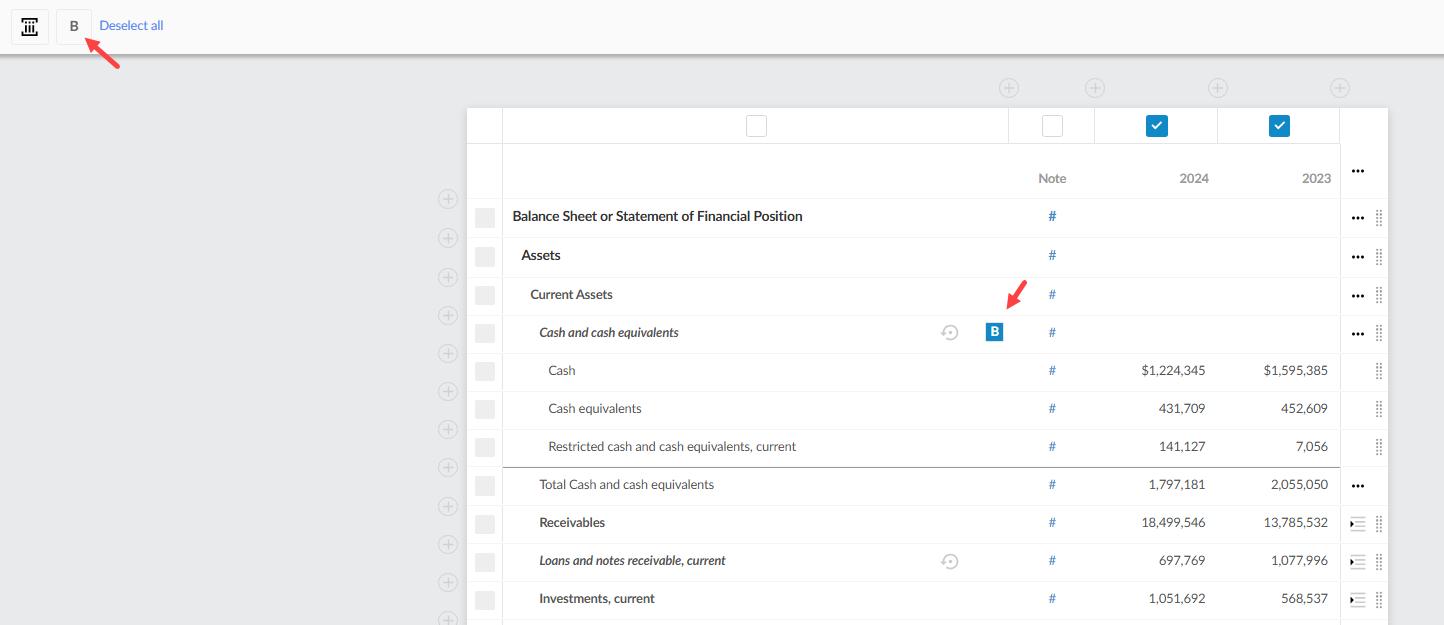
To learn more about dynamic tables, see Add data in the financial statements tables.
See the consolidated total of all entities in a new CY Consolidated Total column
The consolidated total of all entities is now shown in a new CY Consolidated Total column in the Data page, under Accounts. The existing subtotaling column is renamed to CY Consolidated Subtotal. The CY Consolidated Total column is included in the Download Reference Copy.
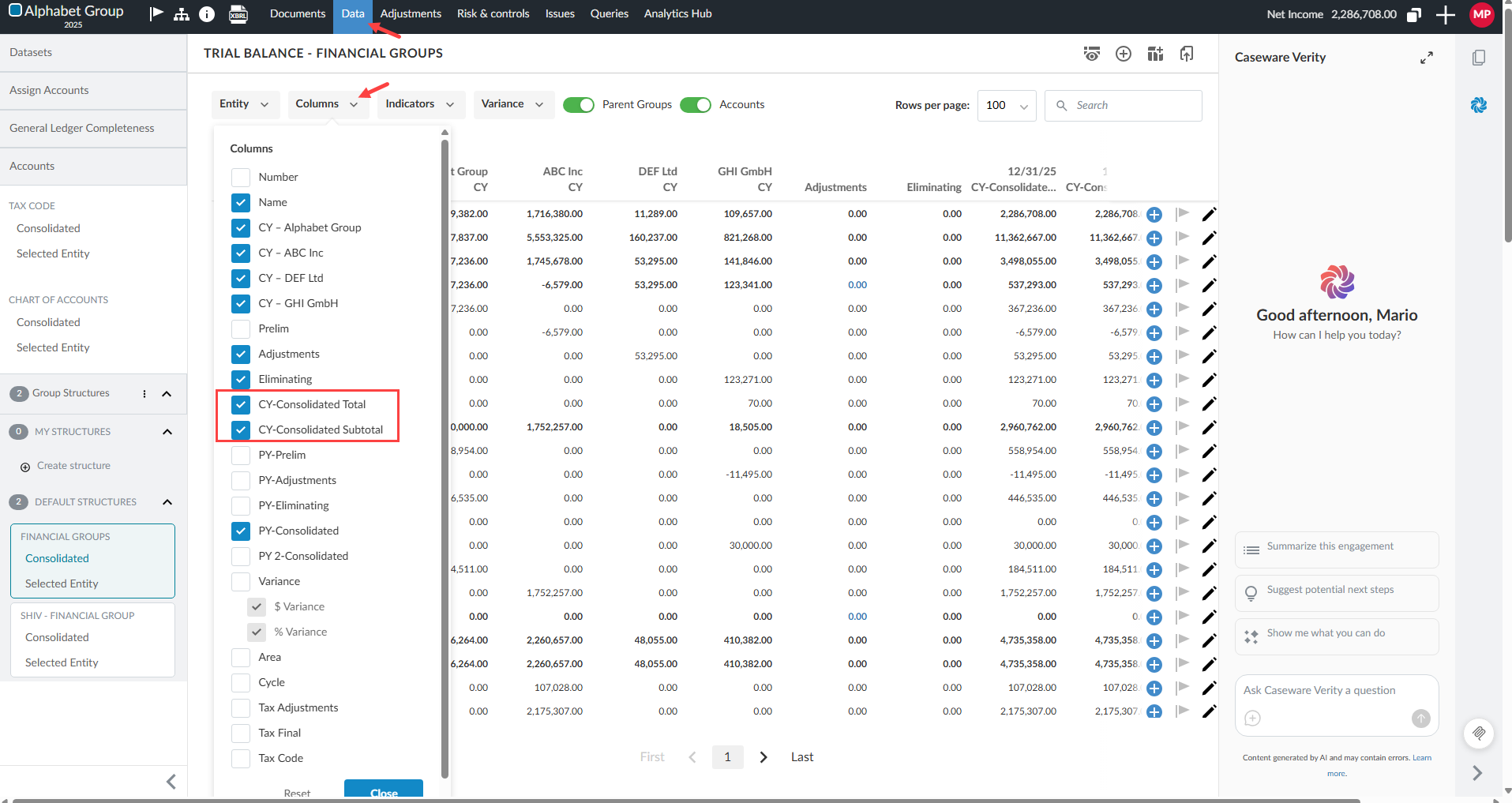
To learn more about consolidated engagements on the Data page, see View data for consolidated engagements in the Data page.
Apply an area or cycle to multiple checklists
You can now link a single area or cycle to multiple checklists in the checklist settings. Previously, only one checklist could be assigned per area or cycle. With this change, when multiple checklists are linked to the same area or cycle, clicking the analysis link in the Risk Assessment page opens each checklist in its own new tab.
This gives you more flexibility in how you organize and access checklists within an engagement, reducing the need to restructure your area and cycle assignments to accommodate multiple checklists.
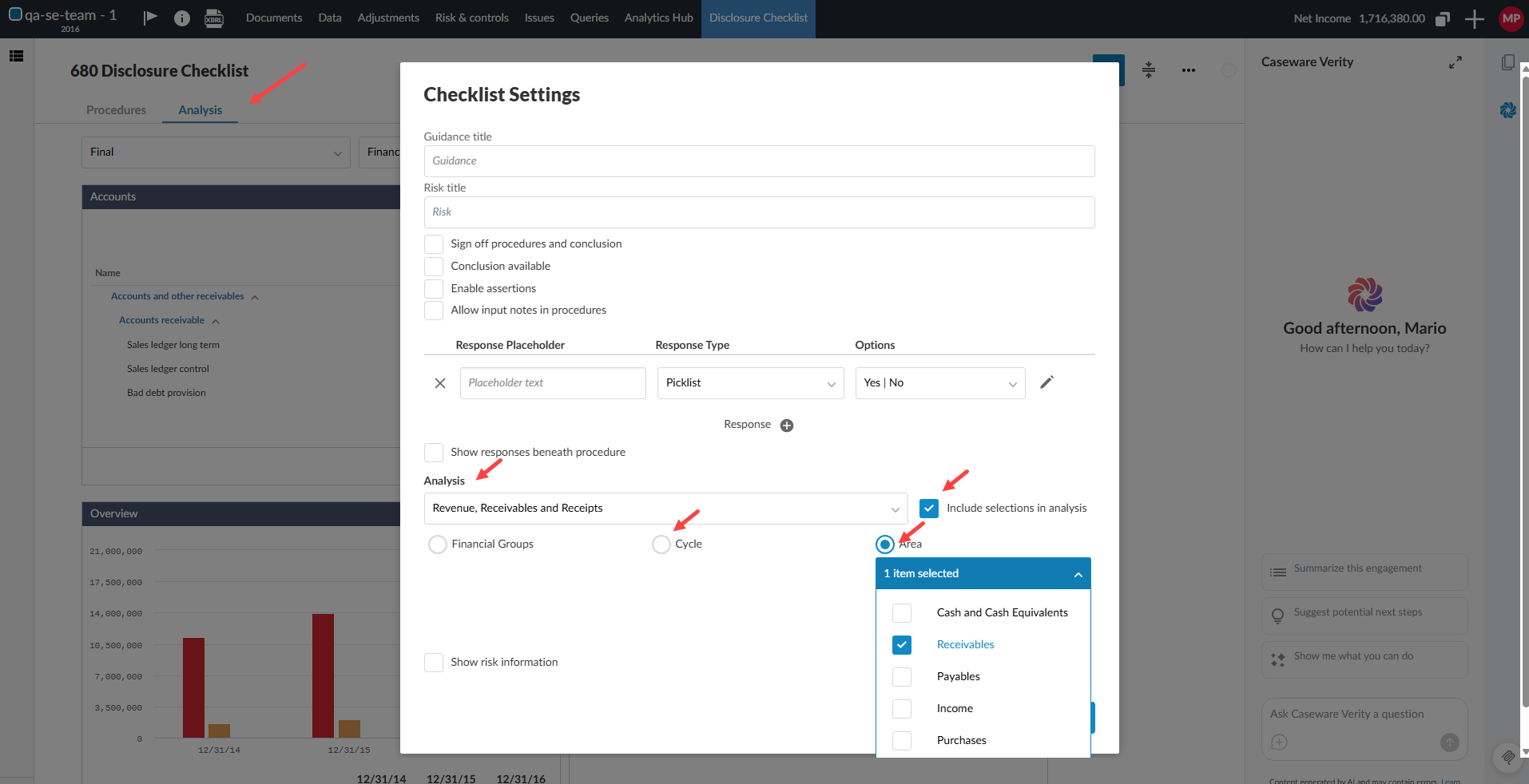
To learn more about areas and cycles, see Manage areas and cycles.
Use budget balances in Cloud Connector
You can now use budget balances in Cloud Connector for non-annual reporting periods. When you select a non-annual reporting period in the right pane, the generated CWI.ACCOUNTBALANCE and CWI.GROUPBALANCE formulas return year-to-date (YTD) values for the selected period. For the current year or prior year 1, selecting Current period basis (or using movement=TRUE) returns the balance for the selected period only instead of YTD values.
The following balance types are now supported for non-annual reporting periods:
-
Initial Budget
-
Revised Budget
To learn more about Cloud Connector, see Insert data using the right pane and List of Cloud Connector functions.