
What's new - OnPoint Audit PCAOB 2026.2.0 Release (v2.2920.0)
Here's a list of what's new in the OnPoint Audit PCAOB 2026.2.0 release.
Content enhancements
Content improvements, such as the addition of updated authoritative references, responses, procedures and lightbulb guidance, have been made to the following checklists:
-
1-100 Engagement Acceptance / continuance
-
1-150 Non-audit services
-
1-200 Engagement set up
-
1-500Q Initial client queries and responses
-
1-560 Communication with the audit committee concerning independence – Annual communication - Draft
-
2-200 Identifying risks through understanding the entity
-
2-250 Fraud scenarios and 2-500 Identifying fraud risks
-
2-300 Understanding the IT environment
-
2-400 Planned risk assessment procedures
-
3-110 Entity-level risks and controls – Integrated audit
-
3-200 General IT controls
-
3-305 Control Implementation – Assertion level controls
-
4-300 Overall audit strategy
-
4-300Q Records and documents queries
-
4-460 Understanding and evaluation of a service organization
-
4-650 Firm deliverables and client information letter - Draft
-
5-115 Tests of controls – Revenues receivables receipts
-
5-200 Use of SOC 1 and/or SOC 2 reports
-
6-120 Summary of external confirmations
-
6-140 Litigation, claims, and non-compliance
-
6-160 Related party transactions
-
6-170 Evaluating the work of a Specialist
-
7-100 Summary of Misstatements
-
7-150 Summary of identified misstatements checklist
-
7-300 Engagement quality review checklist
-
7-500 Reporting setup checklist
-
7-600 Independent Auditor’s Report
-
7-700 Reporting checklist optimizer
-
7-800 Reporting checklist
-
7-900 Report transmittal
-
8-500 Communicating deficiencies in internal control letter - Draft
-
8-550 Communicating control deficiencies in an integrated audit - Draft
Checklist restructure
The 4-500 Team planning discussions – Brainstorming checklist has been deprecated and its content has moved into the 1-600 Initial team planning checklist, removing duplication for firms that hold a single combined planning meeting.
New features and enhancements in Cloud Engagements
Support non-annual reporting periods in Cloud Connector
The Cloud Connector adds support for non-annual reporting periods. This feature lets you pull a specific reporting period's balances into Excel for comparative analysis in an interim engagement (quarterly, semi-annual, or monthly). Examples of specific reporting period balances are:
-
period's year-to-date
-
isolated period movement
-
prior-year equivalents
As firm authors, you can build Excel templates for interim reporting and your users can reuse them when an engagement is carried forward.
Additional document subfolder levels on the Documents page
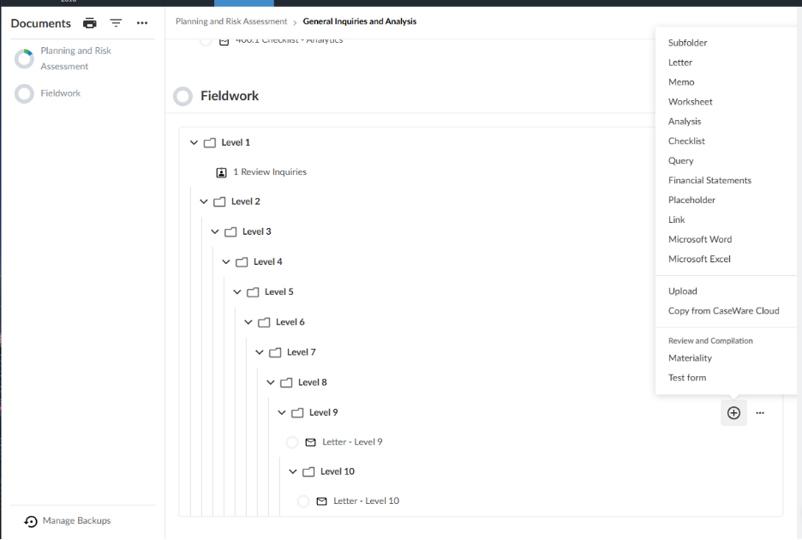
You can now create subfolders on the Documents page, supporting a folder hierarchy up to 10 levels deep. Previously, folder hierarchies were limited to two levels beneath a phase. Engagements with complex, hierarchical document structures no longer need to flatten their organization into this limitation.
This feature lets you:
Authors
-
Move folders and documents to any valid destination at any depth using the move dialog, with validation that prevents invalid or circular moves.
Users
-
Navigate deeply nested folders using the navigation path, which tracks your scroll position and lets you jump to any level in the path.
-
Find documents faster using navigation panel and search, which now reflect the full folder depth.
To learn more about the Documents page, see Customize the Documents page.
Apply an area or cycle to multiple checklists
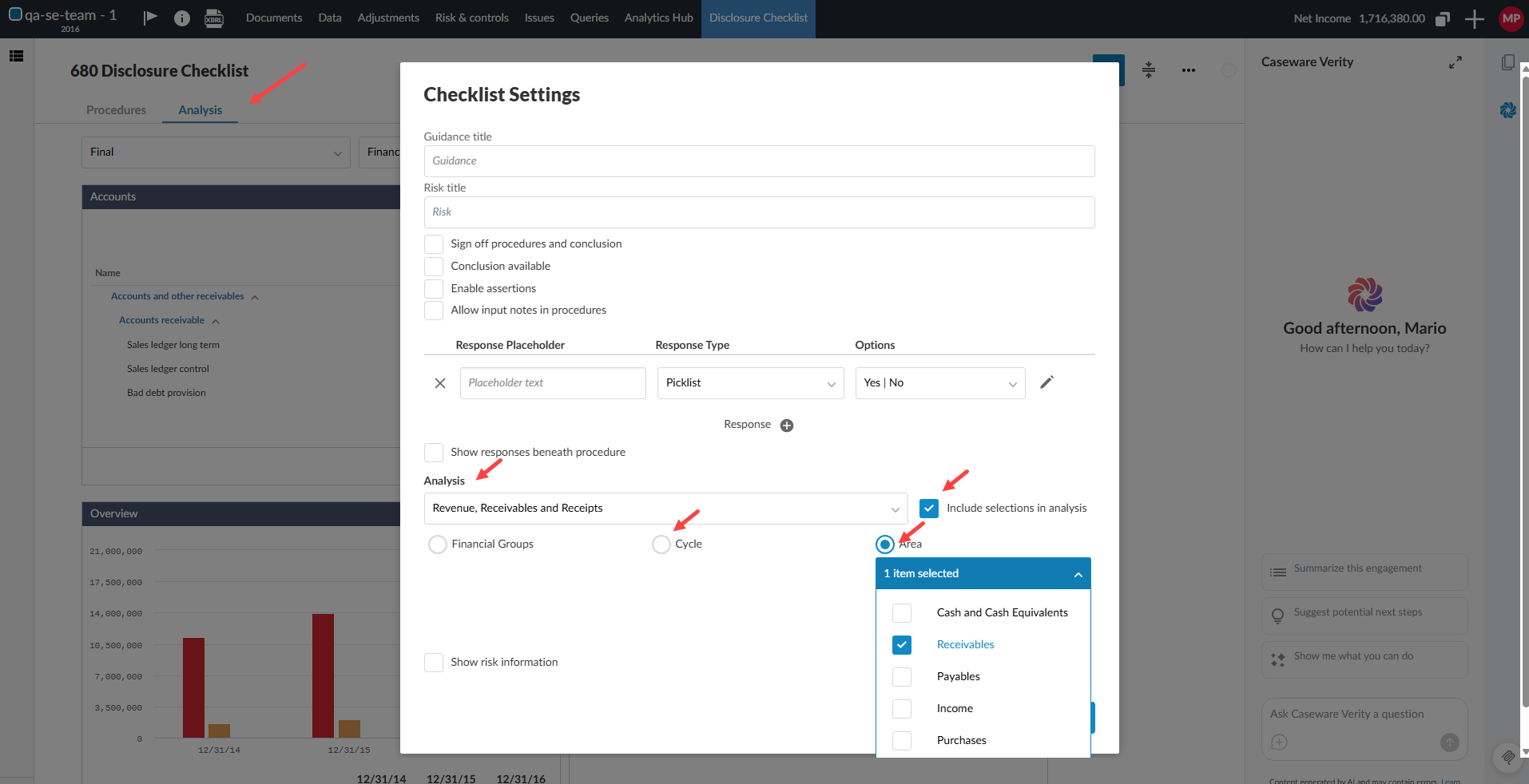
You can now link a single area or cycle to multiple checklists in the checklist settings. Previously, only one checklist could be assigned per area or cycle. With this change, when multiple checklists are linked to the same area or cycle, clicking the analysis link in the Risk Assessment page opens each checklist in its own new tab.
This gives you more flexibility in how you organize and access checklists within an engagement, reducing the need to restructure your area and cycle assignments to accommodate multiple checklists.
To learn more about areas and cycles, see Manage areas and cycles.