
Migrate from Caseware Taxflow (Legacy)
You can migrate engagements from Caseware Taxflow (Legacy) to the new version of Caseware Taxflow. How you migrate depends on whether the engagement has an associated assurance engagement.
Engagements with an associated assurance engagement
Tax groups in the C Corp, S Corp and Partnership grouping structures are linked to financial groups, which populate the tax reconciliation.
To migrate an engagement with an associate assurance engagement:
-
Carry forward the engagement as usual.
-
Select Data | Datasets.
-
Select Import from Caseware Cloud Engagement to import the updated balances.
-
Reapply any tax group mappings that were previously overridden.
Tax-only engagements
A tax-only engagement migrates through an Excel export of the legacy trial balance and tax group mappings.
To migrate a tax only engagement:
-
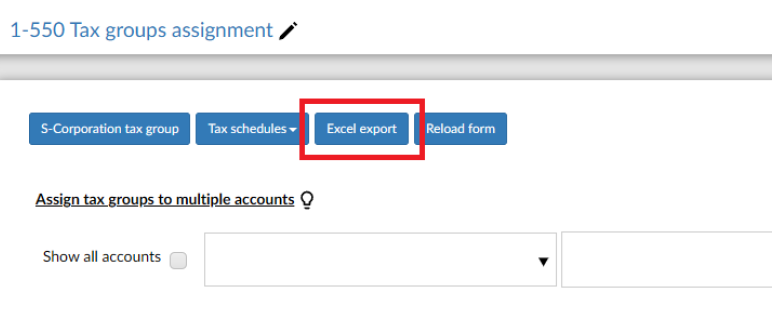
In the Caseware Taxflow (Legacy) engagement, select Excel export in 1-550 Tax groups assignment. This generates a trial balance template with tax group mappings in column E.
-
Update column C with the current year balances, and add or remove accounts as needed.

-
Import the updated trial balance into a new Caseware Taxflow engagement. During the import, map columns A to E as shown in the following table.
Excel column Column type A Account number B Account name C Current year balance D Prior year balance E Financial group number
Once the import is complete, the tax reconciliation on the Data page is populated with the imported balances.
Transfer engagements from Working Papers
Working Papers engagements can be transferred to Caseware Taxflow using Cloudbridge. For more information, see Transfer engagements in bulk with CloudBridge.
Download the mapping files and use the file for your tax vendor and tax year.
Download the Caseware Taxflow CloudBridge mapping files:
| Tax software and entity type | Download |
|---|---|
| CCH – C corporation | |
| CCH – S corporation | |
| CCH – Partnership | |
| GoSystem – C corporation | |
| GoSystem – S corporation | |
| GoSystem – Partnership | |
| Lacerte – C corporation | |
| Lacerte – S corporation | |
| Lacerte – Partnership | |
| UltraTax – C corporation | |
| UltraTax – S corporation | |
| UltraTax – Partnership |