
Neuerungen in Caseware Cloud Engagements 2025-06
Welcome to Cloud Engagements 2025-06! This release introduces the General Ledger Completeness feature, adding links to headers and areas within a document and more.
To learn more about the Caseware Cloud Engagements platform, refer to What is Caseware Cloud Engagements?
Vollständigkeit des Hauptbuches
General Ledger Completeness provides automatic validation, which helps you to quickly identify discrepancies in your trial balance or general ledger data.
You can easily assess the reliability of your data through the automatic calculations provided on the General Ledger Completeness page. This new feature carries forward the prior period account balances as opening balances for the current period. Any changes during the period are added to the opening balances to get the preliminary ending balances. These balances are compared to what you receive from your client so that any differences are highlighted for follow-up.
If the engagement is consolidated, General Ledger Completeness will only display for the parent entity.
In addition, you can now experience user interface and accessibility improvements, which include:
-
Caseware can now include a link to General Ledger Completeness on the Documents page via the internal link option.
-
When the engagement is locked down, you cannot access the page, unless it is an internal link on the Documents page.
-
Accessibility improvements to allow for appropriate keyboard navigation and screen reader support.
-
If an account is assigned to the Retained Earnings group, and accounts have been assigned to income statement groups, the page will reflect the prior period’s closing of net income (loss) to Retained Earnings.
-
The Retained Earnings opening balance will include the net income (loss) from the prior period.
-
The income statement accounts’ opening balances will be reset to zero
-
To learn more about General Ledger Completeness, refer to Assess General Ledger Completeness.

Increase in the number of supported imports per engagement
The previous limit of approximately 65 imports per engagement has been removed. This is useful for consolidated engagements that can have many internal entities in an engagement that require data to be imported for each entity.
Improvements in user experience when deleting a Note
These improvements ensure you fully understand what is removed when deleting a Note within a document. The Delete option is now a prominent red color. A dialog box opens upon clicking Delete, prompting you to confirm your choice and describing all that will be removed permanently from the Delete action.
Automatically carry forward Dynamic Table Border settings
You can now automatically carry forward Dynamic Table Border settings. Carry forward is a time-saving utility that allows you to reuse information from a prior year engagement in a current year engagement. Settings, such as currency symbol types, can be carried forward either in bulk, or you can select which changes to carry forward into the current engagement.
The Dynamic Table Border settings that carry forward include:
-
Header Rows
-
Total Rows
-
Final Rows
-
Description Column
These settings will be carried forward automatically. You will not need to accept the changes.
Hinweise:
-
This feature is available for new and existing engagements.
-
You can override Document Settings at the Area level to apply Area-specific numbered heading options.
-
Area settings changes do not carry forward.
To learn more about carry forward, refer to Carry forward an engagement.
Sampling calculator for random and attribute sampling
You can now generate Attribute sampling analytics from the sample calculator feature in Analytics Hub. This is in addition to Random and Monetary Unit sampling. A sample calculator is embedded in the Test Parameters tab of each analytic test on the Analytics Hub page. It can perform sampling either as part of an analytic test or as a standalone calculator or filter for specific parameters. With sampling, you can quickly generate manageable insights from large datasets, without needing to process all the data.
You can generate a sample from either your client’s transactions or from schemaless data. Schemaless data refers to unstructured transaction data that doesn’t follow a predefined format. In Caseware, this type of data must be imported using the Other dataset type.
Die Attributstichprobe ist ein statistisches Verfahren zur Beurteilung der Häufigkeit eines bestimmten Merkmals innerhalb eines Datasets. Each attribute is binary, having only two possible outcomes—true or false, commonly used for testing controls or compliance.
Deletion of analytic test results
You can now remove data from analytics results (including sample datasets) for better data management within engagements. This includes the ability to use filters to refine selections of data for deletion. Data or datasets are permanently removed including any references such as filters and aggregated results.
A comprehensive workflow is included with this feature to ensure that:
-
You are aware of what you are deleting.
-
The deletion is permanent.
-
If the deletion fails, you are clearly advised and prompted to retry or contact technical support.
What's new for Authoring
Mehrsprachige Funktionen für Checklisten
As a firm or enterprise author, you now have multilingual capabilities in the editable fields of checklists that are authored by you. Dies umfasst bearbeitbare Felder in den folgenden Prüffelder Ihrer Checkliste:
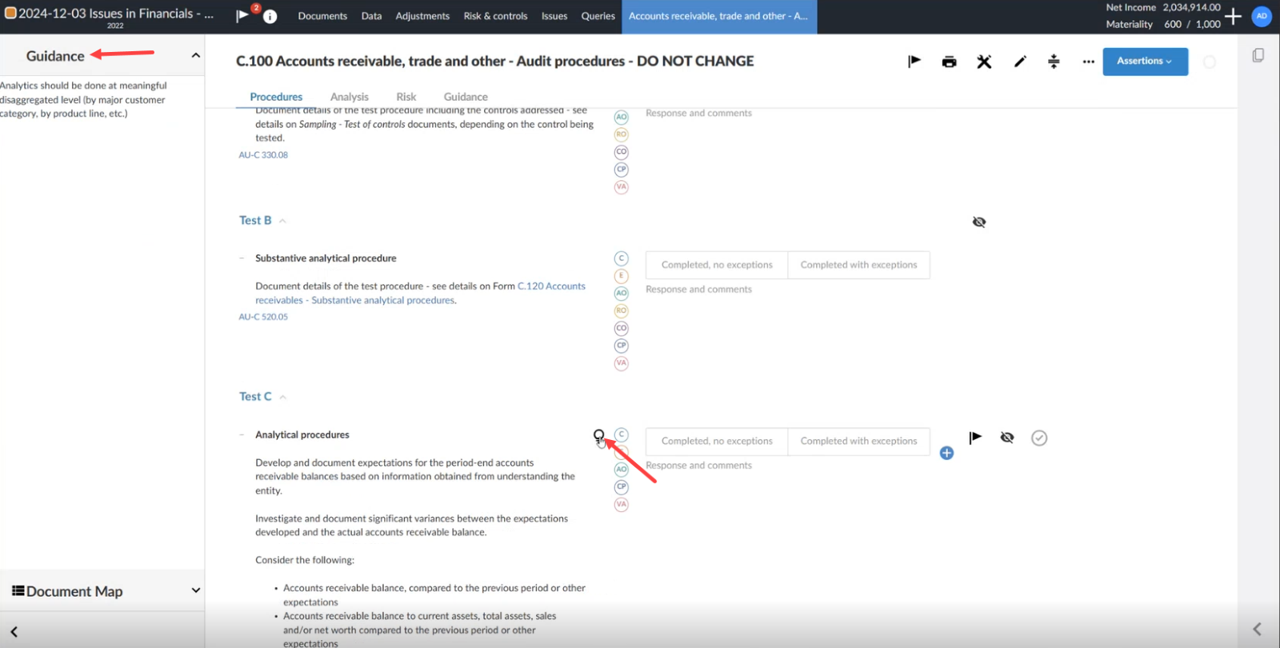
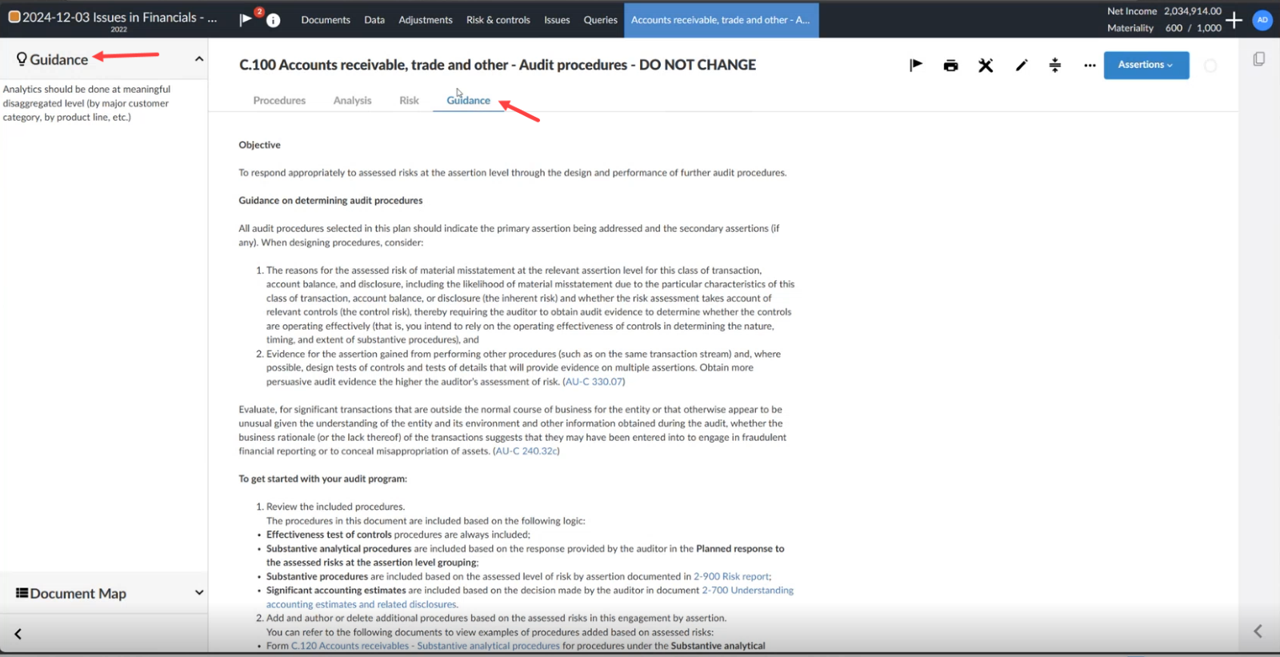
Guidance fields
-
Accessed from within the Procedures tab
-
Accessed from the Guidance tab of a checklist
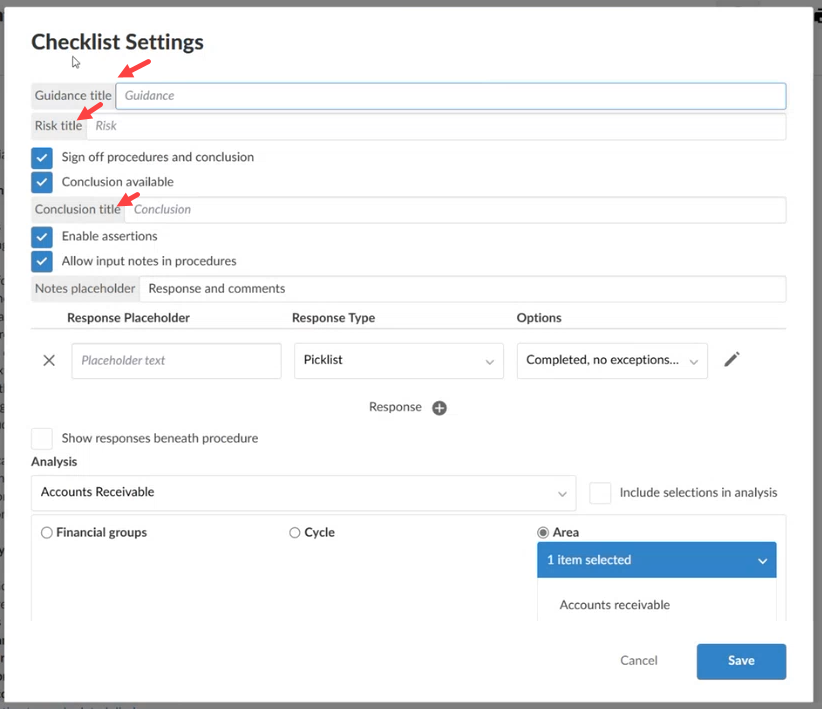
Titles for the following within the Checklist Settings:
-
Überschrift der Anleitung
-
Risikobezeichnung
-
Titel der Schlussfolgerung
In der Registerkarte Prüfungshandlungen:
Auf der Registerkarte Anleitung:
Innerhalb der Checklisten-Einstellungen:
Caseware determines the number and selection of languages available for documentation within an engagement. As an enterprise or firm author, you can choose which of these languages to include.
Add Notes and Area headings as reference links to financial statements
Your users can now add reference links to Notes and Area headings in different areas within your financial statement. Referenzlinks können sowohl zu Textbereichen als auch zu dynamischen Tabellen hinzugefügt werden. This feature is useful in complex or large reports. Improvements to referencing includes:
-
Das Hinzufügen von Bereichsüberschriften, die als Verweise in das Dokument Ihres Benutzers eingefügt werden können.
-
Ein zusätzliches Suchfeld innerhalb des Dialogfelds zur Auswahl einer Referenz.
-
Erweiterbare und zusammenklappbare Drop-down-Listen, die alle Unternotizen oder Überschriften enthalten können.
Insert Note reference


Insert reference into a dynamic table

Fixes in 2025-06
The icon for the Caseware Cloud Connector add-in has been updated for MS Excel.