
Nebenbuchdaten verstehen
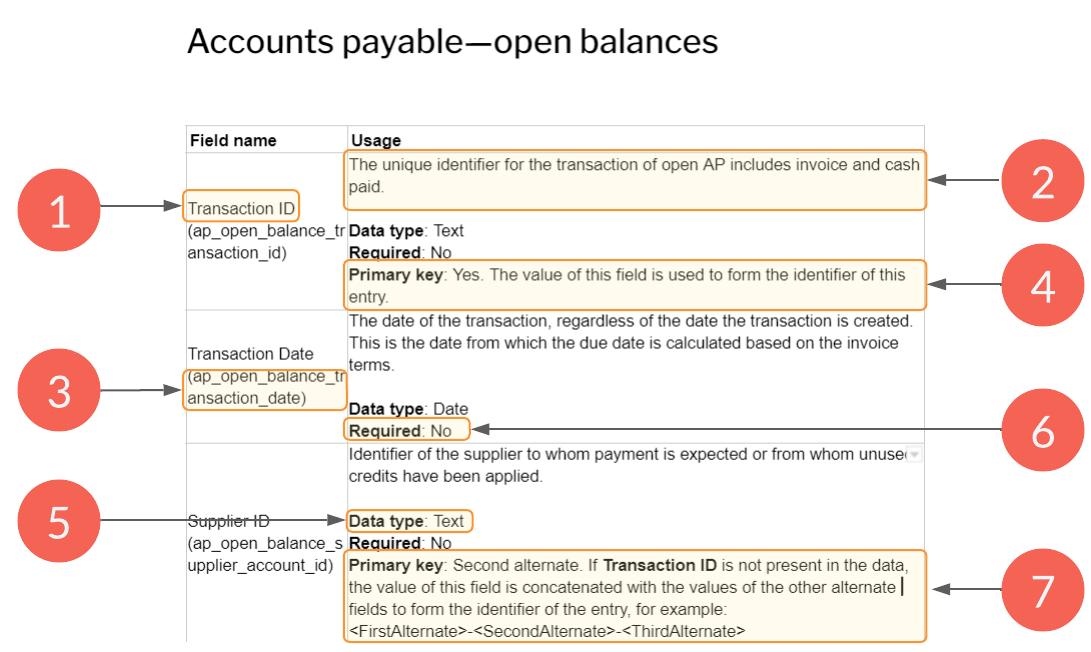
See Subledger datasets described for the types of subledger dataset you can import into Caseware Cloud. Each dataset description lists the mandatory and optional fields making up transactions for that type of subledger dataset and the purpose of each field. The diagram below explains the basic elements of the subledger dataset descriptions.
For more information on importing transaction data from CSV files, see Import the client’s transactions from a CSV.
Anatomy of a subledger dataset description
| Element | Beschreibung |
|---|---|
| 1 | User-facing name. The name of the Caseware field as it appears in the drop-downs of the Assign Fields window, where you map fields in your incoming data to Caseware fields. |
| 2 | Field description. This details the purpose of the field and where applicable examples of possible values. |
| 3 | Internal field name. The internal name of the Caseware field, which you will need to know if you are manipulating data imported for analytic notebooks or other third-party development work where you are manipulating the raw imported data. |
| 4 | Primary key. If a field is a primary key, its value is used to uniquely identify the data entry or row of the data. |
| 5 |
Data type. The types of values a field can have and the operations that can be performed.
|
| 6 | Required. Indicates whether the field is required to be able to import a transaction of this type into Caseware Cloud. |
| 7 | Primary key alternate. If the field that is designated as the primary key is absent from the data you are importing, the value of the primary key alternate, or one of several primary key alternates, is used to create a unique identifying code for the data entry by concatenating their values together: <FirstAlternate>-<SecondAlternate>-<ThirdAlternate> |
Subledger datasets described
| Subledger dataset | Beschreibung |
|---|---|
| Verbindlichkeiten aus LuL- Rechnungen |
Das Dataset Verbindlichkeiten aus LuL - Rechnungen enthält alle im Prüfungszeitraum erhaltenen Rechnungen. |
| Verbindlichkeiten aus LuL- geleistete Zahlungen |
The Accounts payable—payments made dataset contains all payment transactions (check, wire transfer, cash, and so on) made during the period. |
| Verbindlichkeiten aus LuL- Lieferanten |
Das Dataset Verbindlichkeiten aus LuL- Lieferanten enthält alle Details zum Lieferanten, wie Kontaktdaten, Adresse, Kreditlimit usw. |
| Verbindlichkeiten aus LuL - offene Salden |
The Open accounts—payable dataset contains details regarding all open, unpaid, or unresolved payable transactions as of the close of business on a specified date. |
| Forderungen aus LuL- Rechnungen |
Das Dataset Forderungen aus LuL - Rechnungen enthält alle im Prüfungszeitraum erstellten Rechnungen. |
| Forderungen aus LuL- erhaltene Zahlungen |
Das Dataset Forderungen aus LuL- erhaltene Zahlungen enthält alle im Berichtszeitraum getätigten Zahlungstransaktionen (Scheck, Überweisung, Bar usw.). |
| Forderungen aus LuL- Kunden | Das Dataset Forderungen aus LuL- Kunden enthält alle Details zum Kunden, wie Kontaktdaten, Adresse, Kreditlimit usw. |
| Forderungen aus LuL- offene Posten | The Accounts receivable—open balances dataset contains details regarding all open, unpaid, or unresolved customer transactions as of the close of business on a specified date. |
| Bestandstransaktionen | Captures all transactions affecting inventory accounts during the time period specified (for example, receipts, shipments, transfers, returns, and adjustments). |
| Aktueller Bestand | Erfasst die vorhandenen Bestandsmengen von Artikeln nach Lagerort sowie deren Beträge zum angegebenen Datum. |