
Zellreferenzen in dynamischen Tabellen hinzufügen
Best Practice: In Engagement Settings, where you have rounding set up in Format | Numbers, there are recommendations to follow for settings in Features | Financial Statements. See Rounding setup recommendations for more information.
You can reference values from one dynamic table into another. This eliminates the need to manually enter the same value multiple times in different tables in the financial statements.
To add cell references:
-
Wählen Sie die Tabelle aus.
-
Select More actions (
 ), then choose Edit Dynamic Table.
Die Tabellenoptionen im Bearbeitungsmodus.
-
Go to the desired cell and select the fx icon.
Hinweis: The cell must be an Input row or Input column cell.
-
In the Calculation dialog, select Insert data (fx).
-
The Data Link dialog opens. Wählen Sie die Registerkarte Zellreferenz.
-
Wählen Sie aus der Drop-down-Liste Bereich/Notiz wählen aus der Liste der verfügbaren Bereiche oder Notizen, auf die Sie verweisen möchten.
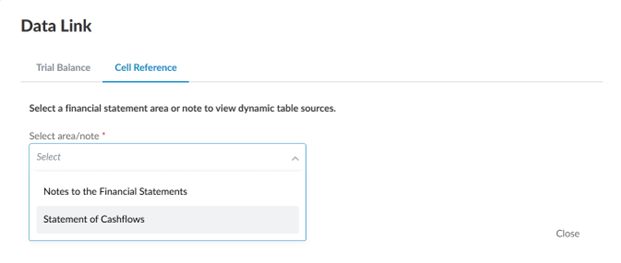
-
Suchen Sie im Feld Dynamische Tabelle auswählen nach einer Tabelle im Bereich Jahresabschluss oder Notiz oder wählen Sie eine Tabelle aus der folgenden Liste aus..
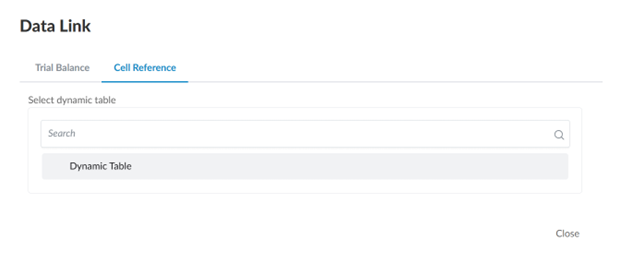
-
In the dynamic table preview, select the applicable cell to reference.
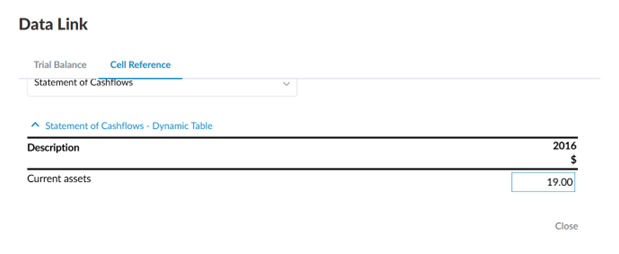
-
Select DONE to close the Calculation tab.