
Eine Web-API-Anwendung erstellen (ADFS)
Erstellen Sie eine Web-API-Anwendung für die Cloud-Instanz Ihrer Firma und definieren Sie die Anwendungsberechtigungen.
Eine Web-API-Anwendung erstellen:
-
Klicken Sie in der ADFS-Verwaltungskonsole auf den Ordner Application Groups und führen Sie danach einen Doppelklick auf Ihrer neuen Anwendungsgruppe aus.
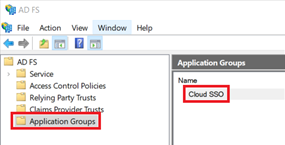
-
In the Properties dialog, click Add Application.

-
In the Template list, select Web API. Klicken Sie auf Next.

-
In the Identifier field, paste the Client Identifier that you copied to a text document previously. Klicken Sie auf Next.

-
In the list of access control policies, select the policy that best applies to your firm. Klicken Sie auf Next.

-
In the Permitted scopes list, select the following scopes:
-
allatclaims
-
email
-
openid
-
profile
Klicken Sie auf Next.

-
-
Klicken Sie auf Next, um die Konfiguration abzuschließen.